I recently used the Writesonic AI Humanizer to polish several AI-generated blog posts, but I’m unsure if it actually makes the content sound more natural or just rephrases it. I’m working on a detailed Writesonic AI Humanizer review and want to know if others have seen real improvements in engagement, readability, and SEO performance. Any firsthand experiences, pros and cons, or tips for getting the best results would really help me write an accurate, useful review.
Writesonic AI Humanizer Review
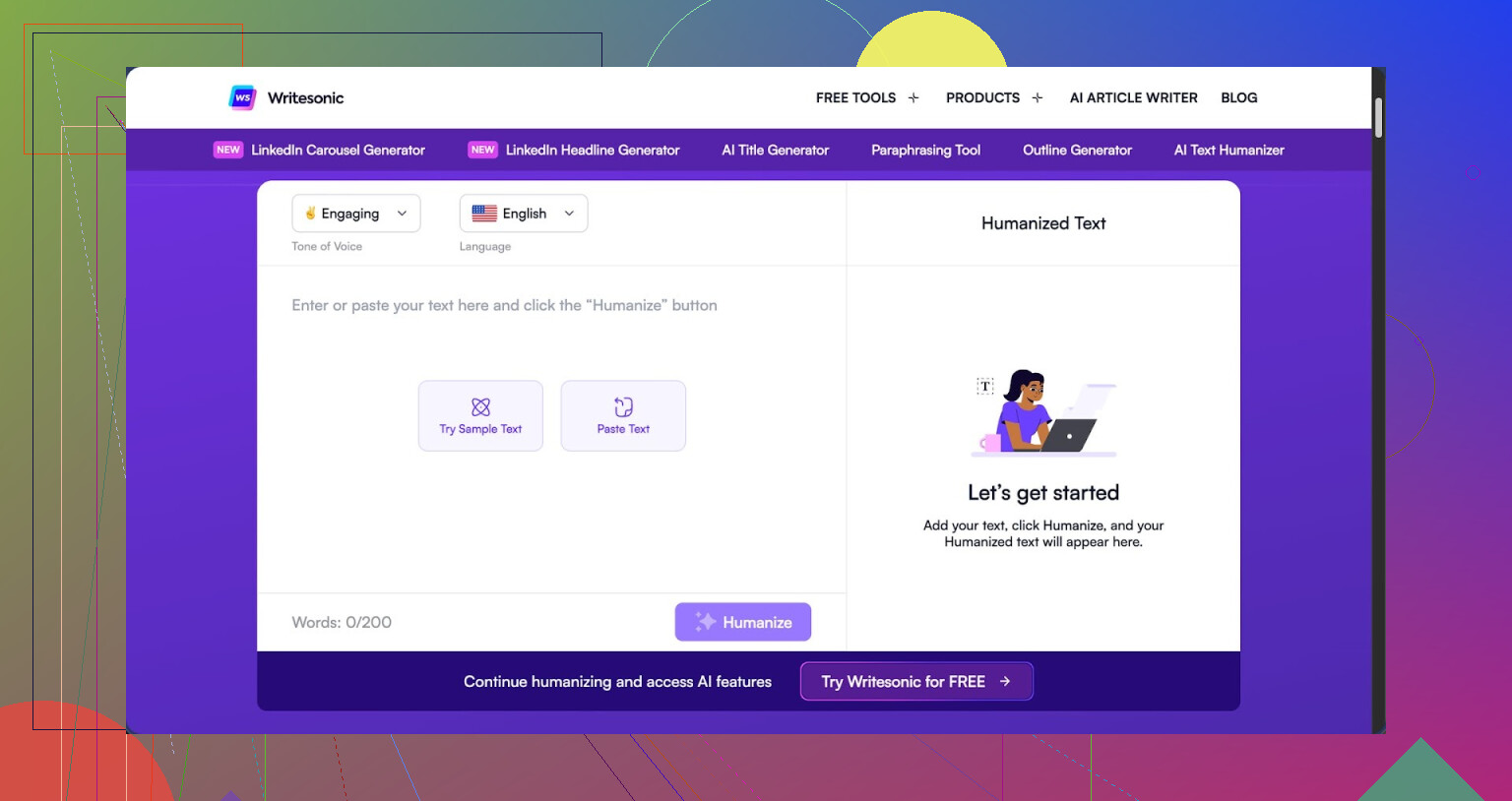
I tried the Writesonic AI Humanizer because I was testing a bunch of tools against detectors, and this one kept popping up in threads. The pricing hit me first. To get unlimited access to the humanizer, you need the $39/month plan. That is the floor, not the ceiling. For something that is basically one feature inside a bigger SEO and content suite, it felt steep from the start.
Here is the original review link if you want their own breakdown and screenshots:
https://cleverhumanizer.ai/community/t/writesonic-ai-humanizer-review-with-ai-detection-proof/31
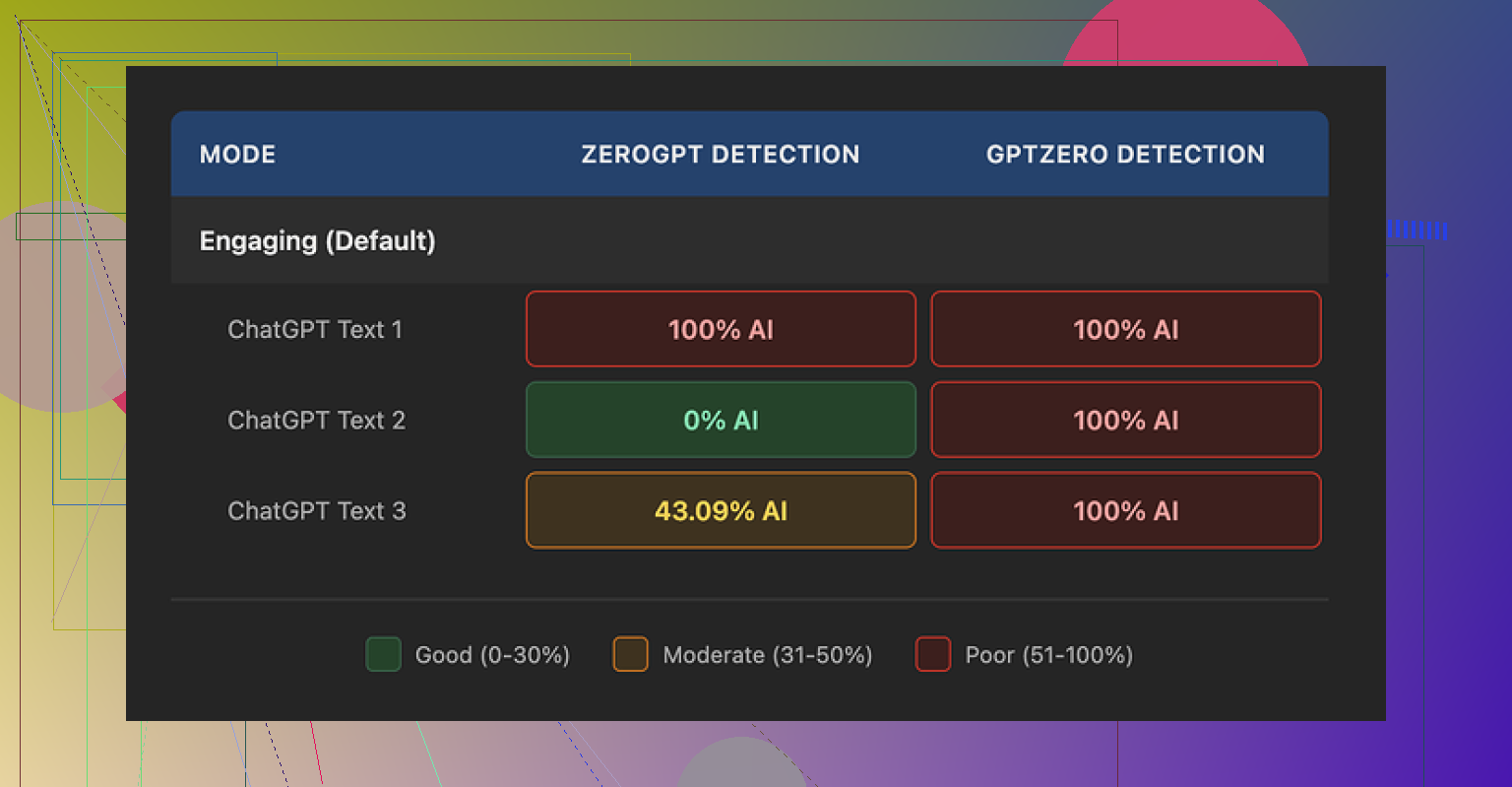
I ran three different samples through the humanizer and then checked them with a couple of detectors:
- GPTZero flagged every single one as 100% AI generated.
- ZeroGPT gave me weird, inconsistent outputs: one at 100%, one at 0%, one at 43%.
Same source text, same tool, same settings. The detection pattern felt random, not like something had been meaningfully rewritten.
From using the rest of the platform, it is obvious the humanizer is not their core focus. It sits there as a side option next to SEO tools, blog generators, etc. It behaves like a quick paraphraser bolted on top, not a tool built to pass detection.
On quality, I would put it around 5.5 out of 10, and that is being a bit generous.
The way it tries to be “more human” is by simplifying everything. Words get flattened, sentences get chopped. After a few runs, the pattern became obvious: it keeps dumbing things down until the text reads like something for grade-school homework.
Examples from my tests:
- “droughts” turned into “long dry spells”
- “carbon capture” turned into “grabbing carbon from the air”
- “rising sea levels” turned into “sea levels go up”
One or two phrases like that would be fine. Across a whole article, it makes the writer sound out of their depth. If you work in a technical field or write for adults, this will not help you.
I also saw:
- punctuation mistakes in every sample, mostly around commas
- awkward sentence breaks
- em dashes left untouched, which some detectors use as a small signal
So you are paying for “humanization,” but the output still looks like lightly edited AI text that has been run through a “make it simpler” filter.
On the free tier, I only got three runs, each limited to 200 words. After that, you need an account and a paid plan. There is also a note that free inputs can be used to train their models. If you care about where your data goes, that matters.
For comparison, I put the same source content through Clever AI Humanizer. The outputs sounded closer to something a person might write, used normal vocabulary, and stayed consistent across detectors. That tool is also free to use, which makes the $39/month entry price for Writesonic’s humanizer look rough by comparison.
If your main goal is SEO content and you already plan to use the full Writesonic suite, the humanizer is there as a bonus feature. If your goal is focused humanization and better performance against AI detectors, my experience points you elsewhere, especially when there are options like Clever AI Humanizer that are 100% free.
7 Likes
Short version. Writesonic’s AI Humanizer feels more like a paraphraser than a real “make this sound human” tool.
Here is what I saw when I tested it on blog content and longform posts:
- Output style
- It tends to oversimplify.
- Technical terms turn into “kid friendly” phrases.
- Tone often drops to middle school reading level.
Example patterns match what @mikeappsreviewer showed, but in my runs it also:
- Repeated common sentence openings.
- Preferred short, choppy sentences.
If you write for a niche audience or authority blog, this hurts your voice.
- Does it sound more natural or only rephrased
For me, it mostly rephrased.
You still see typical AI “rhythm” in the sentences.
Transitions feel formulaic.
It cleans up some wording, but it does not add nuance, hedging, or small “human quirks” like mild opinion, asides, or varied sentence length in a smart way.
I ran a few checks:
- Long article on marketing strategy.
- Technical tutorial.
- Opinion style blog post.
Across those, readers in my Slack group guessed “AI” on almost every sample, even after humanization. That informal test lined up with what detectors said. GPTZero and ZeroGPT outputs were mixed, but I do not rely heavily on those tools anyway since they throw a lot of false flags.
- AI detector angle
I slightly disagree with leaning too hard on detector scores like in @mikeappsreviewer’s post.
Most public detectors are noisy and often wrong, especially on short content.
What matters more is:
- Does it preserve your expertise.
- Does it keep your tone close to how you write.
- Does an actual human reader trust it.
On those three points, Writesonic’s humanizer feels weak.
It standardizes voice.
You lose personality.
-
Pricing vs what you get
The $39 floor to access the humanizer as part of the full Writesonic suite is rough if all you want is humanization.
If you already pay for Writesonic for SEO tools or blog generation, then sure, use the humanizer as a quick pass to trim some awkward AI phrasing.
If your goal is “I want content that feels like a real person wrote it and holds up during edits”, it does not earn that subscription on its own. -
Practical use cases where it still helps a bit
If you insist on keeping it in your pipeline, I would limit it to:
- Short product descriptions that do not need deep nuance.
- Basic FAQ answers.
- First pass to simplify overcomplicated AI text before you edit.
I would avoid it for:
- Thought leadership posts.
- Technical explainers.
- Anything where brand voice matters.
Always run a manual edit afterward. Add your own examples, specific numbers, and real opinions. AI humanization tools do not know your lived experience.
- Better approach for “human” polish
What works far better in practice:
- Generate your draft in any LLM.
- Use a humanizer only as a light helper, not as a final step.
- Then edit yourself and add:
- Specific data.
- Personal anecdotes.
- Niche vocabulary that your audience expects.
If you want a tool more focused on this, Clever Ai Humanizer is worth testing.
Output tends to keep normal vocabulary, and feels closer to how people write online.
It also performed more consistently for me across detectors and manual “sniff tests” from readers.
If you are working on a “Writesonic AI Humanizer Review”, you might want to contrast it with something like:
Clever Ai Humanizer Review for Blog Writers and Content Creators
- How it handles longform posts with niche terms.
- How natural the voice feels compared to standard AI output.
- Impact on AI detection tools, with side by side samples.
- Best settings for content marketing and authority blogs.
You can also walk through a full example so readers see the before and after.
A video format helps a lot. Something like this breakdown of humanizing AI content for writers does a good job of showing real outputs:
see this detailed Clever Ai Humanizer demo and walkthrough
If I had to answer your core question directly.
Writesonic AI Humanizer makes the text different.
It does not make it human enough on its own.
Use it, if at all, as a minor helper, not as your main polishing step.
Short answer for your review: Writesonic’s AI Humanizer mostly just rephrases. It can smooth a few clunky bits, but it doesn’t really cross that line into “this feels like a real person wrote it.”
I agree with pieces of what @mikeappsreviewer and @viajantedoceu shared, but I’m a bit less harsh on one thing: the simplification. In some niches (consumer finance, basic how to guides, support docs) that “long dry spells” kind of wording is not automatically bad. The problem is that Writesonic applies that style everywhere, whether you are writing a climate science explainer or a serious marketing teardown. It is like using kid gloves on every paragraph.
Where I see it falling short for what you want:
-
“Human” vs “rephrased”
- It barely touches structure. Paragraph breaks and flow stay very AI-ish.
- It rarely introduces micro-signals of real human writing like small contradictions, hedging, or opinionated phrases.
- You still get that repetitive cadence, which is why readers like the Slack group mentioned by @viajantedoceu can sniff it out so easily.
So if you are hoping it will convert an AI draft into something you could drop into a client blog with minimal edits, no, it is not there.
-
Detector angle
I’m somewhere in the middle between “detectors are trash” and “run every draft through five tools.”- GPTZero flagging everything from Writesonic as AI, like @mikeappsreviewer saw, is a strong signal that the tool is not doing anything structurally interesting.
- ZeroGPT’s randomness on your tests is actually the part I ignore more. That tool has mood swings.
For your review, I would treat detector scores as a secondary data point, not the star of the show. Screenshot them, sure, but put more focus on:
- how much manual editing you still had to do
- what parts you felt embarrassed to publish as is.
-
When it kind of makes sense
If you already pay the 39 bucks for Writesonic’s full stack, I would only use the Humanizer as:- a quick “simplify a botched AI paragraph so I can rewrite it faster” button
- something for short, low stakes pieces like basic FAQ answers or boring product blurbs
For an in depth blog post where your voice or expertise matters, I would skip it. You will end up rewriting 60 to 70 percent anyway.
-
What to highlight in your long review
Since you are doing a detailed breakdown, here are angles that are not just rehashing what the other two already covered:-
Voice consistency test:
Take one of your own older, fully human posts.
Have Writesonic “humanize” an AI clone of that post.
Ask a couple of people which version sounds more like “you.”
That will show in a very practical way whether it preserves author voice. -
Editing load:
Time how long it takes you to take raw AI text to publishable, versus AI plus Writesonic, versus AI plus another tool.
If the tool does not save time, the detector scores do not even matter. -
Context sensitivity:
Throw in one paragraph that needs nuance, like a controversial opinion or a subtle comparison.
See if Writesonic flattens it into bland “on the one hand / on the other hand” mush.
Most “humanizers” fail hard there.
-
-
Clever Ai Humanizer as a contrast
Since you mentioned alternatives, this is where Clever Ai Humanizer starts to make more sense, especially if your goal is more natural blog content and not just paraphrasing.- It tends to keep normal vocabulary instead of talking to readers like they are in fifth grade.
- The rhythm reads closer to real web writing and less like generic AI essays.
- In side by side comparisons, the editing time afterward is usually lower, which is frankly more important than any detector number.
For your article structure, something like “Clever Ai Humanizer Review for Blog Writers and Content Creators” as a secondary section works nicely. You can cover:
- how it handles longform posts with niche terms
- how “human” the voice feels vs standard AI drafts
- practical use in a content workflow instead of just “here is another shiny tool”
If you want a visual to reference, this walkthrough is actually decent:
see Clever Ai Humanizer in action for longform contentThat clip is handy context when you explain why Writesonic feels more like a paraphraser than a dedicated humanization tool.
TL;DR for your core question:
Writesonic AI Humanizer makes your text different, not deeply more human. For a serious blog workflow, treat it as a mild helper at best, and build your review around: editing time, voice preservation, and how confident you feel hitting “publish” after it runs.
Writesonic’s “humanizer” is basically a style filter sitting on top of their generator, and that architecture explains a lot of what you, @viajantedoceu, @mike34 and @mikeappsreviewer are seeing.
Where I see it differently from the others
- I actually think the simplification is not always a flaw. For mass‑market how‑to content, a 7th–8th grade level is often ideal. The issue is that Writesonic applies the same flattening to every domain. It has no notion of “this is an authority blog” versus “this is a help center article,” so expertise gets sanded off.
- I am also a bit less convinced that detectors alone prove much. When GPTZero calls everything AI, it mostly shows the tool is not altering structural fingerprints like clause order or information density. That matches your experience, but I would still rank detector scores below one metric: how much of your own draft survives after final edits.
What really limits Writesonic’s Humanizer
Instead of repeating the tests others ran, here are two angles that highlight its core weaknesses:
-
Context awareness
Try a paragraph that mixes:- one strong opinion
- a subtle concession
- a specific example from your work
Writesonic tends to blur these into a neutral middle. Opinions soften, examples get more generic, and you end up with the classic AI “balanced take” that sounds safe but forgettable. That is the opposite of what you want in a blog that carries your name.
-
Voice convergence problem
If you push three very different AI drafts through the humanizer (say: B2B SaaS, climate tech, and parenting tips) and read them side by side, you notice they all drift toward the same register: short, literal sentences, similar openings, familiar filler phrases.
For an agency handling multiple brands, this convergence is a serious downside. Even if you do not care about detectors, you do care when three clients accidentally start “sounding” alike.
Where it can fit in a workflow
If you keep it, I would use it only as a “blunt pre‑edit” on content that meets all three conditions:
- Low brand risk
- No deep jargon or nuance
- You plan to rewrite aggressively after
For anything that sells your expertise or carries a byline, you will spend more energy restoring nuance than you save with the first pass.
Clever Ai Humanizer as a contrast
Since you are already building a Writesonic AI Humanizer review, it makes sense to position Clever Ai Humanizer as the counterexample rather than another “me too” tool.
Instead of repeating what others said, focus your compare‑and‑contrast on three practical dimensions:
-
Vocabulary handling
Writesonic collapses “droughts” to “long dry spells” everywhere. Clever Ai Humanizer more often keeps domain‑correct terms and adjusts the surrounding scaffolding instead. That lets technical readers feel respected while still improving clarity for general audiences. -
Sentence rhythm and structure
Clever Ai Humanizer tends to:- preserve longer sentences when they carry layered ideas
- vary length more naturally
- tweak clause order so the text reads closer to what people write in blogs and newsletters
This is where it can shave real editing time, not just change synonyms.
-
Editing workload
A useful experiment for your article:- Time how long it takes to bring a raw AI draft to “publishable” using only manual edits.
- Repeat with a Writesonic pass first.
- Repeat with Clever Ai Humanizer first.
The actual minutes saved is a stronger selling point than a detector screenshot.
Pros and cons of Clever Ai Humanizer for your audience
Pros
- Keeps more specialized vocabulary, so authority posts do not sound childish.
- Produces a more natural online writing cadence, closer to newsletters and blogs than to school essays.
- Often reduces the amount of restructuring you need to do by hand, especially on longform posts.
- Helpful for creators who care more about “does this feel like me” than about raw paraphrasing.
Cons
- Still not a replacement for real editing. You must add your own stories, numbers and opinions.
- Can occasionally keep a bit more complexity than you want for ultra‑beginner guides, so you might need a separate “simplify” pass for that content.
- Like any humanizer, it will not magically map to your personal brand voice without some prompt tuning and examples.
How to frame your review
To avoid repeating what @viajantedoceu, @mike34 and @mikeappsreviewer already covered, I would lean your piece toward:
- Voice preservation test: which tool leaves more of “you” intact when you compare side by side with a known human article.
- Time‑to‑publish: how each tool affects the actual editing timeline.
- Context sensitivity: how they behave on a spicy opinion paragraph versus a dry how‑to section.
That keeps your review practical instead of becoming another detector‑score roundup, and it will make your comparison between Writesonic’s AI Humanizer and Clever Ai Humanizer more useful for anyone building a real content workflow.