My iPhone has gotten really slow over the past few weeks with lag, app crashes, and battery drain. I want to know what actually helps speed up a slow iPhone without doing a full factory reset because I have important photos, apps, and settings I don’t want to lose. Looking for real fixes for iPhone performance problems that work.
A pricey phone choking on stuff like typing, opening Messages, or swiping between apps is brutal. I went through this on an iPhone after an update, and a full wipe was not the fix. I’d try a few smaller things first.
If you updated iOS recently, give it time
This part gets missed a lot. After a big iOS update, the phone spends time in the background rebuilding a bunch of stuff. Photos get reindexed. App data gets cleaned up and rebuilt. System files get sorted out. During that stretch, performance drops hard. Scrolling feels sticky. The keyboard misses beats. Apps open slow.
What helped me was simple. I left the phone plugged in, connected to Wi Fi, overnight for two or three nights. A restart helped too. Once those background jobs finished, it felt normal again.
If you are still dealing with lag after a week, I’d stop blaming the update alone.
Storage is usually where the mess starts
iPhones need free space for temp files and system work. When storage gets tight, the whole device starts dragging. From what I’ve seen, once free space gets down into the 10 to 20 percent range, weird slowdowns start showing up. You notice it first in small things. Typing delay. App launch delay. Random pauses.
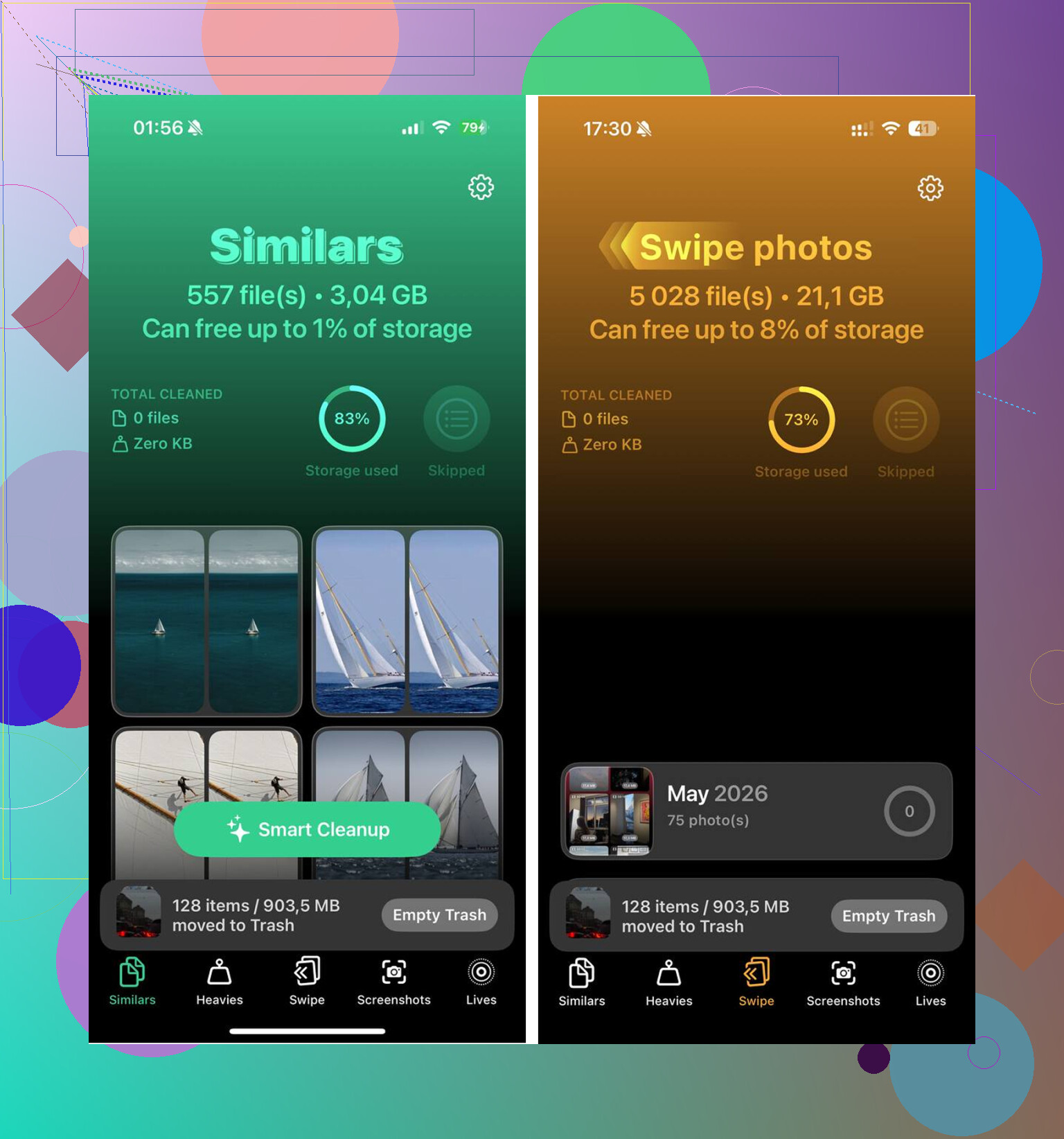
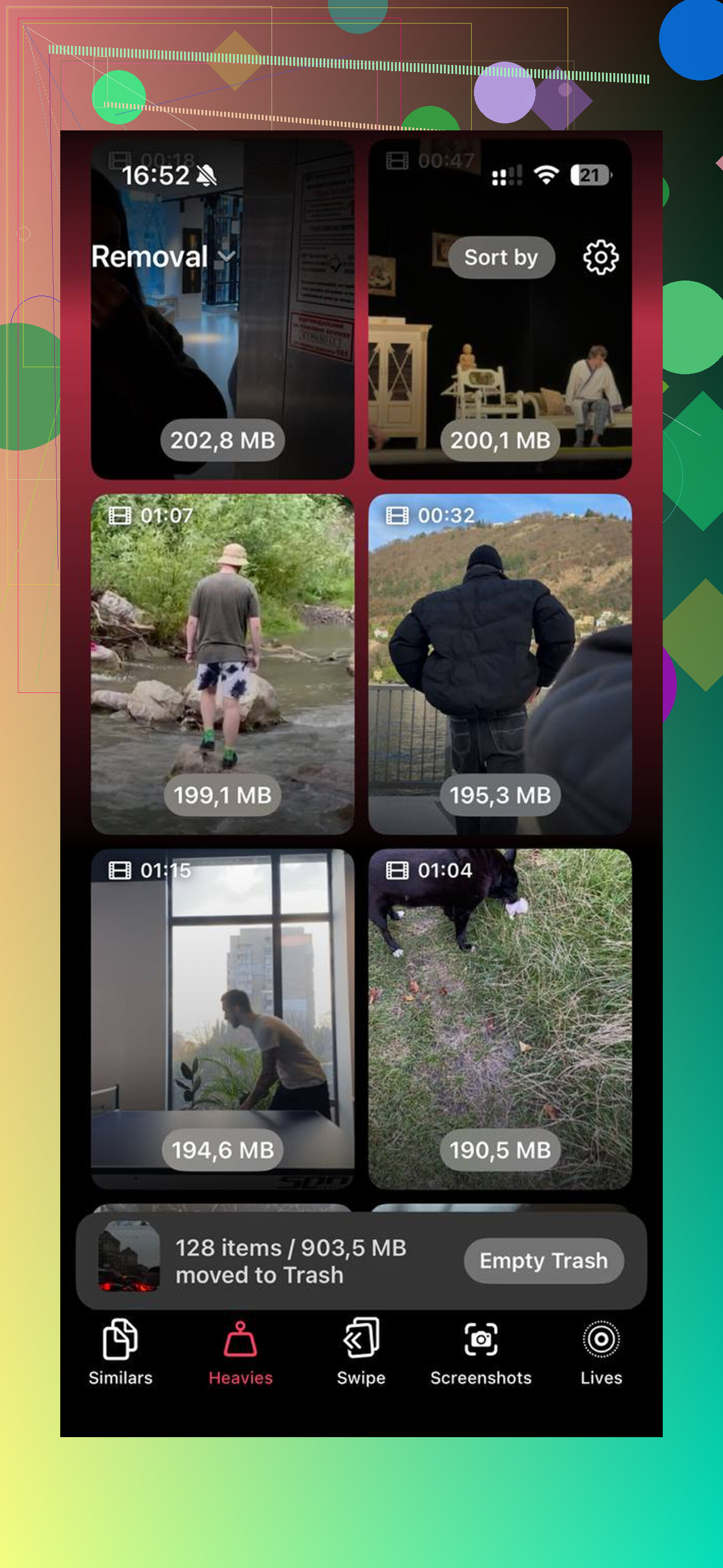
For most people, photos and videos are the main problem. I tried cleaning mine by hand and it was miserable. Too many near duplicates, old screenshots, giant videos I forgot existed. What ended up helping was Clever Cleaner.
The parts I found useful:
- Similars grouped nearly identical shots together. Not only exact duplicates. It also caught the five versions of the same photo where I tapped the shutter too many times. It picked a best shot, then I cleared the extras fast.
- Heavies showed the biggest files first, with file sizes visible. That made it easy to spot old 4K clips and screen recordings eating space.
- Screenshots laid out all the junk screenshots with sizes shown on each one. Once I saw how much room they were using, deleting them got easy.
- It runs on the device, which mattered to me because I did not want personal photos sent anywhere.
I cleared about 15GB. The phone sped up right after. One thing people forget, open Photos and empty Recently Deleted too. If you skip that, those files still sit there and keep using storage for 30 days.
Settings changes worth trying
If storage is fine, or if you already cleaned it up and want more improvement, these are the settings I’d check.
- Turn off Low Power Mode if you leave it on all the time. It cuts performance to save battery, and you feel it.
- Open Settings > General > Background App Refresh. Shut it off for apps you do not care about updating all day. I saw less random sluggishness after trimming this.
- Open Settings > Accessibility > Motion and enable Reduce Motion. This removes a lot of animation overhead. On slower phones, it makes the device feel less choppy.
- Update your apps in the App Store. Some lag after an iOS update comes from apps lagging behind, not the phone itself.
Battery health matters more than people think
This one is easy to miss. Go to Settings > Battery > Battery Health.
If maximum capacity is under 80 percent, iOS starts managing performance more aggressively so the phone does not shut off under load. Translation, it slows down. A worn battery makes the whole phone feel old even when the hardware is fine.
If your battery health is low, replacing the battery usually does more for speed than messing with settings for hours. It also costs a lot less than replacing the phone.
Before you wipe the phone, try this
If none of this helped after a full week, I’d do Reset All Settings first.
Path is Settings > General > Transfer or Reset iPhone > Reset > Reset All Settings.
This does not remove your apps, photos, or files. It resets system settings, network stuff, display preferences, and a few hidden bits that sometimes get messed up after a major update. I’ve seen this fix stubborn lag when restarts and cleanup did nothing.
A factory reset is still there if you need it. I would not start there.
71 Likes
Skip the factory reset for now. I don’t fully agree with @mikeappsreviewer on waiting it out unless you updated iOS a day or two ago. If this has been going on for weeks, I’d look for one bad app, bad battery behavior, or storage churn.
What fixes it for me:
-
Check Battery usage by app.
Settings > Battery.
If one app shows huge background use or screen time you don’t recognize, delete it and reinstall it. I’ve seen Instagram, Outlook, and some shopping apps tank performance and drain battery after a buggy update. -
Kill Safari bloat.
Settings > Safari > Clear History and Website Data.
Then close old tabs. If Safari has 200 tabs and a pile of site data, the phone feels gross. Sounds dumb, helps more than people think. -
Remove widgets you don’t need.
Widgets refresh often. Weather, stocks, sports, map widgets, they all poll in the background. Same for busy lock screen widgets. I cut mine down and the phone stopped heating up as much. -
Check for overheating.
If your iPhone feels warm most of the day, performance gets throttled. Common causes are wireless charging, poor signal, GPS apps, and video uploads. Test one day with Bluetooth off, fewer widgets, and no wireless charger. See if the lag drops. -
Offload giant apps.
Settings > General > iPhone Storage.
If an app is 5GB to 20GB with lots of ‘Documents & Data’, offload or delete/reinstall. TikTok, Instagram, Spotify, Podcasts, and Messages are common offenders. Messages with years of photos and voice notes gets bad fast. -
Change Messages retention.
Settings > Apps > Messages > Keep Messages.
Set it to 1 year or 30 days if you don’t need a forever archive on your phone. Same idea for large attachments review in iPhone Storage. This one is boring, but it works. -
Turn off iCloud Photos sync for a bit if it is stuck.
If Photos is syncing forever, indexing, or chewing battery, pause it for a day while charging and on Wi-Fi, then turn it back on. Endless photo sync loops are brutal.
If storage is the issue, Clever Cleaner is worth a look. It’s one of the few iPhone cleanup tools people mention without imediate regret. If you want a readable breakdown, this Clever Cleaner for iPhone review with storage cleanup details covers what it does.
If your phone is still lagging after all this, I’d suspect the battery or one corrupt app cache before I’d wipe the whole thing. Resetting all settings is fine. Full erase is last resort stuff.
I’d do one thing neither @mikeappsreviewer nor @sternenwanderer really leaned on enough: check iPhone analytics for crash loops.
Go to Settings > Privacy & Security > Analytics & Improvements > Analytics Data. If you see the same app or process name over and over, that’s often the actual culprit. One bad app can make the whole phone feel busted. Delete that app first, not your whole phone. Same idea if a VPN, keyboard app, or security app is installed. Those are weirdly common lag machines.
Also, app crashes + battery drain together sometimes screams storage corruption inside a few giant apps, not system-wide damage. Offloading helps, but I usually just delete/reinstall the worst offenders. Messages, Instagram, TikTok, Spotify, Gmail, and Safari are usual suspects. Yeah, Safari too. People baby it like it’s innocent.
Another thing I kinda disagree on: “just wait out the update” only makes sense for a few days. If it’s been weeks, nah, something is stuck.
What’s worked for me before a reset:
- force restart
- remove any VPN/profile you forgot about
- uninstall custom keyboards
- turn off live wallpapers / excessive widgets
- check Analytics Data for repeating crashes
- delete and reinstall top battery-drain apps
- update carrier settings if prompted
If storage is part of it, Clever Cleaner is actually useful for clearing photo junk fast, especially duplicates and bloated videos. I also liked this real-world Clever Cleaner review and cleanup results because it breaks down what it actually cleans.
Factory reset is absolutley last resort stuff. Most slow iPhones have a smaller gremlin causing the mess.
I’m with @sternenwanderer and @reveurdenuit on avoiding a wipe, but I’d push one thing they only touched lightly: check whether the slowdown is tied to one context, not the whole phone. If lag mostly happens in poor signal areas, on CarPlay, during Bluetooth audio, or while charging, that points to radios/thermal throttling more than “general iPhone rot.” A factory reset won’t fix bad reception cooking the modem all day.
What I’d do that’s different:
- Turn off AssistiveTouch if you use it. Sounds minor, but persistent overlays can make older iPhones feel janky.
- Disable automatic downloads for apps and iOS updates temporarily. Constant background installs can be sneaky.
- Check Mail accounts. A bad Exchange or Gmail sync can hammer battery and freeze the phone. Remove and re-add the worst offender.
- Test without Focus filters, lock screen widgets, and live activities. Sports scores and ride apps are sneaky drainers.
- Look at Panic logs and Jetsam events in Analytics, not just app names. Repeated memory pressure events usually mean one app is bloated or the phone is starved for space/RAM.
I don’t fully agree with @mikeappsreviewer if this has dragged on for weeks. “Let it finish indexing” is valid for a few days, not forever.
If photo clutter is part of the storage mess, Clever Cleaner is one of the few cleanup apps worth trying.
Pros:
- good at duplicates/similar shots
- easy way to find huge videos
- simple interface
Cons:
- cleanup apps can’t perform miracles outside the files Apple lets them access
- you still need to review deletes carefully
- if your battery health is bad, storage cleanup alone won’t fix speed
My order: test heat/signal issues, check Mail sync, remove Live Activities, then battery replacement if health is rough. That fixes more “slow iPhones” than resets do.
Try a clean network test. VPNs, ad blockers, security apps, and custom DNS profiles often create lag, crashes, heat, and battery drain.
Open Settings > General > VPN & Device Management. Disable the VPN and remove any profile you no longer need. Then open Settings > Wi-Fi, tap your network, choose Configure DNS, and set it to Automatic.
Restart your iPhone and use it for 24 hours. If performance improves, reinstall only the essential network app. This takes five minutes, keeps every photo, and avoids endless storage tweaking. Check work profiles first, since removing one might affect email acess.
The problem with this thread is that if you actually do all of it, you’ll never know what fixed the phone. Five people just handed you twenty knobs to turn. Turn them one at a time. Change something, restart, use the phone for a day, then decide if it helped. Otherwise you’re guessing.
Something nobody flagged: how long since you actually powered the thing off? Not force restart, just a normal shut down and cold boot. Phones that stay on for weeks accumulate junk in memory and stale processes, and a slow phone plus app crashes plus heat is a pretty classic sign of that. Costs nothing, takes two minutes. I’d do that before touching profiles or DNS like @virtualnode4011hq suggested, even though that advice is fine on its own.
On the battery point from @mikeappsreviewer, I’d put that higher than storage, honestly. If Battery Health is under 80 and you’ve got the throttling, no amount of clearing photos changes how the phone feels under load. You can wipe 15GB and still have a sluggish device because the CPU is being held back to protect a tired battery. Check that number first. If it’s low, the battery swap is the fix and everything else is noise.
Clever Cleaner is genuinely handy for the photo pile, the Similars and big video stuff especially, and it’s free so there’s no reason not to run it as a quick check. Just don’t expect a cleanup app to solve lag that’s really about battery or a corrupt app cache. It clears space. That’s it. Space matters when you’re down in the single digit percent range, less so if you’re already sitting comfortable.
So my order would be: cold restart, check battery health, watch Analytics for a repeating crash like @reveurdenuit said, then clean storage if it’s actually tight. Do them separately. That’s the only way you learn what your phone actually needed.