I recently used GPTHuman AI and I’m unsure if the results and suggestions it gave me are accurate, reliable, or if I might be misunderstanding how to use it properly. I’d really appreciate help reviewing what it did, understanding any limitations, and knowing how to get better, more trustworthy outputs from it for my projects.
GPTHuman AI Review
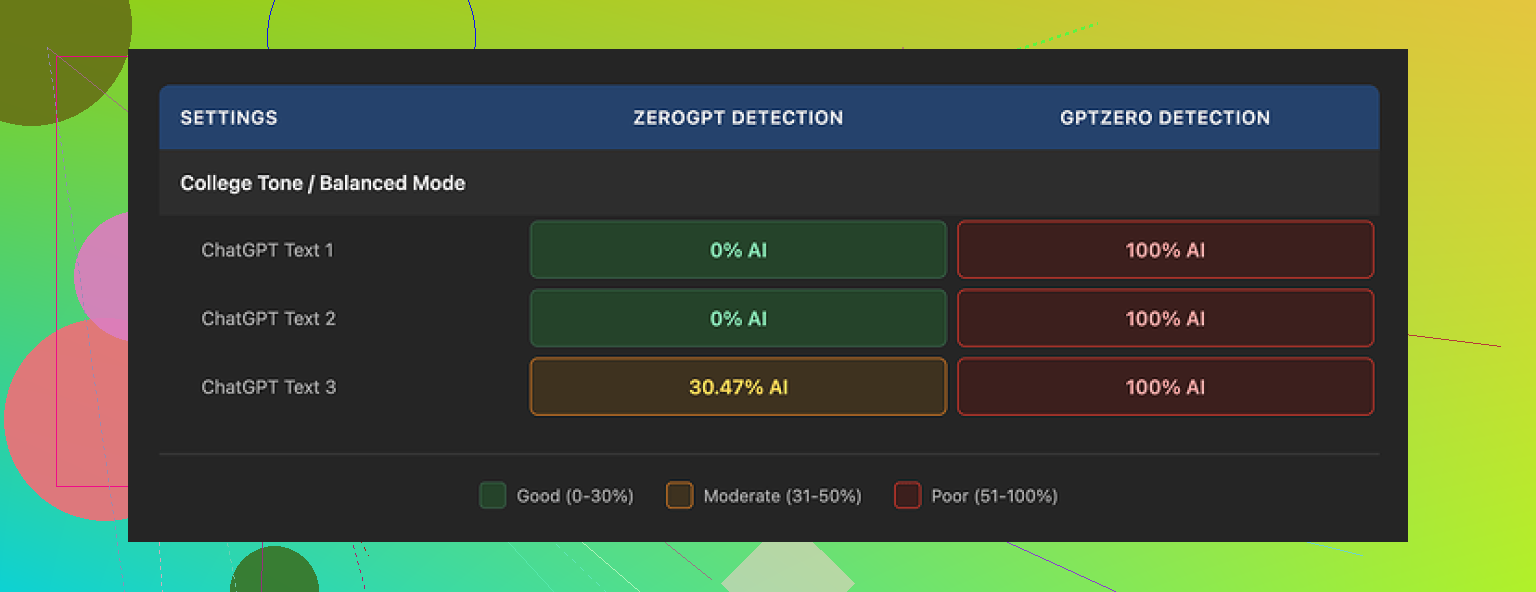
I tested GPTHuman because of the line on their page about being “the only AI humanizer that bypasses all premium AI detectors.” That line hooked me, then the results pushed me in the opposite direction.
I ran three different pieces of text through it, then checked everything with external detectors:
- GPTZero flagged every single “humanized” sample as 100% AI. All three.
- ZeroGPT marked two of them as 0% AI, but the third one came back around 30% AI.
So already there is a gap between what the tool hints at and what happens in practice. The internal “human score” inside GPTHuman showed high pass rates on the same outputs. Those numbers did not line up with what GPTZero or ZeroGPT said.
The writing itself
Leaving detection scores aside, I looked at the writing quality.
Output structure looked neat enough. Paragraphs were spaced decently, so it does not look like total spam on first glance.
Then I started reading carefully:
- Several subject verb mismatches, like “people is” type stuff.
- Fragments treated like full sentences.
- Word swaps that broke the meaning, as if a synonym was jammed in where it did not belong.
- Some endings of the samples were so scrambled I had to re-read them twice to guess what the sentence was trying to say.
If you plan to paste this into client work or academic writing without edits, you will have a bad time. You would need to line edit every paragraph.
Limits, pricing, and small print
The free tier annoyed me more than I expected. GPTHuman cut me off around 300 words total. Not 300 words per piece. 300 words across my entire session.
To finish my usual test set, I ended up:
- Burning through one free account.
- Spinning up two more Gmail accounts.
- Logging in and out like it was 2010 again.
On paid plans:
- Starter starts at $8.25 per month if you pay yearly.
- The “Unlimited” plan is $26 per month, but each output is still limited to 2,000 words per run.
So even at the top tier, you are not feeding in a long report or book chapter in one go.
There are some policy bits that matter if you care about privacy or client work:
- All purchases are non-refundable.
- Your text is used for AI training by default. There is an opt out, but you need to toggle it.
- They reserve the right to use your company name in promotional material unless you explicitly tell them no.
If you work under NDAs or school policies, you should pause and read that twice before you upload anything sensitive.
How it compared to other tools
While benchmarking, I ran the same source text through multiple “humanizer” tools and checked them with the same detectors, using the same prompts and word counts.
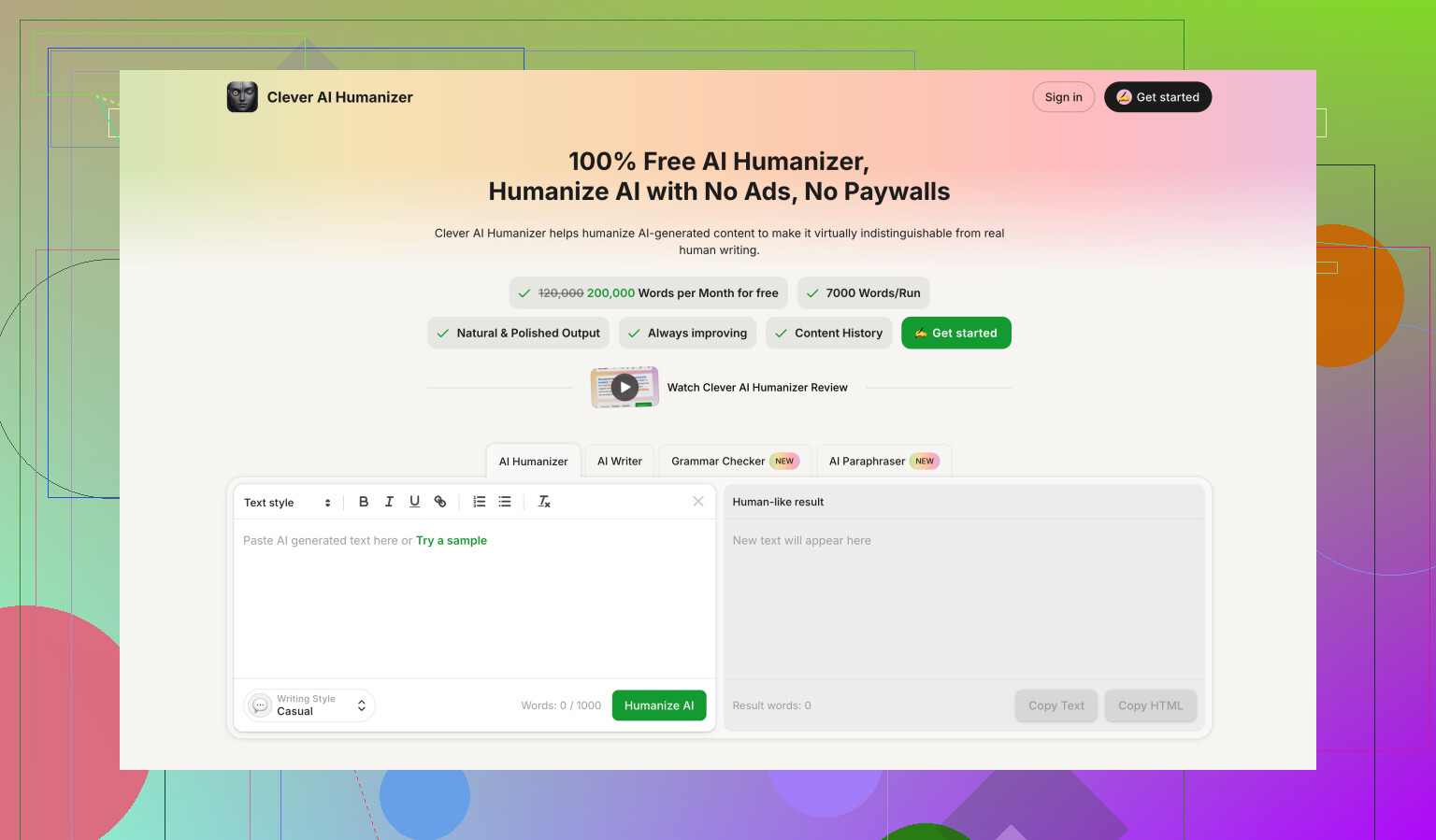
Clever AI Humanizer did better in my runs. The scores leaned stronger on external detectors and it stayed fully free at the time I tested it, which made repeated experiments easier.
Link to the more detailed test thread and results:
My takeaway
If your goal is to reduce AI detection scores in a reliable way, GPTHuman did not earn my trust after these tests. The mismatch between the internal “human score” and GPTZero output, plus the grammar issues and the tight free limit, made it hard to justify the subscription. If you still want to try it, treat the output as a rough draft you need to clean up by hand, not a ready to send final.
3 Likes
You are not misunderstanding GPTHuman. Your confusion makes sense.
Here is how I would look at it, without repeating what @mikeappsreviewer already tested in detail.
-
How to “read” GPTHuman’s scores
If GPTHuman shows a high “human score” but GPTZero or ZeroGPT still mark it as AI, treat the internal score as marketing, not as a real metric.
Use external detectors as your reference, not the built in one.
If your workflow depends on passing specific detectors, run every output through those same tools before you rely on it. -
What to do with the output
From what you describe, plus what Mike saw, GPTHuman outputs need heavy editing.
Here is a quick sanity checklist you can run on any piece it gives you:
- Read it out loud. If you trip on sentences, the structure is off.
- Search for weird word choices that look like forced synonyms.
- Check subject verb agreement in long sentences.
- Compare it with your original. If core meaning shifted, do not use it as is.
If the text feels worse than your starting version, stop using that output. Treat it as noise.
- If your goal is lower AI detection
Some practical steps that work better than pushing everything through one “humanizer” and hoping:
- Shorten long sentences into 2 or 3 simple ones.
- Add personal details that only you or your field would say.
- Change generic phrases. For example, swap “in today’s world” with something specific to time or context.
- Mix in your own typos and edits. Detectors look for clean, uniform style.
You can also try a different tool as part of your test set.
Clever Ai Humanizer keeps coming up in tests, including in Mike’s writeup.
Use it side by side with GPTHuman on the same paragraph.
Run both versions through GPTZero or whatever detector matters for your use case.
Keep the one that matches your needs on detection and readability.
- Privacy and policy angle
If you work with client docs or school work, recheck:
- Is training on by default in GPTHuman for your account.
- Are you ok with non refundable payments.
If not, keep anything sensitive out of it and only use generic samples.
- How to test if you are “using it right”
Take one paragraph of your text.
Run it through:
- GPTHuman
- Clever Ai Humanizer
- A manual edit you do yourself
Then send all three through the same detector and also read them side by side.
Ask yourself two things:
- Which one sounds most like you.
- Which one hits the detector target.
If GPTHuman loses on both, it is not about you using it wrong. It is about tool fit.
You’re not misunderstanding GPTHuman. The tool really is that confusing.
Couple thoughts that might help you make sense of what you saw, without rehashing what @mikeappsreviewer and @nachtdromer already laid out.
- Treat “humanization” as style distortion, not accuracy
GPTHuman is basically a style scrambler. It tries to roughen up text so detectors see it as “less AI.” It is not designed to:
- Preserve your exact meaning
- Maintain clean grammar
- Match your natural tone
So if you fed it something clear and got back something slightly garbled, that’s actually consistent with how these tools work. They’re not optimizing for correctness. They’re optimizing for “looks different from base GPT output.” That’s why you probably saw:
- Awkward phrasing
- Odd word swaps
- Sentences that feel “off” even if you can’t say exactly why
If accuracy and clarity matter more than detection, GPTHuman is the wrong starting point.
- Internal score vs external detectors
I’d go a bit further than the others and say: ignore the internal “human score” completely. It’s not that it’s “marketing-heavy.” It’s functionally useless for any real decision-making, because:
- You can’t see how it is computed
- It does not correlate well with GPTZero / ZeroGPT scores
- It creates a false sense of safety
You did nothing wrong here. The tool is just presenting a number that looks like validation, but isn’t.
- Why the results feel worse than your original
GPTHuman (and similar tools) are trying to break the statistical patterns detectors key on:
- Repetitive sentence structures
- Overly clean grammar
- Predictable word choice
To do that, they often:
- Introduce “mistakes” on purpose
- Add unnecessary synonyms
- Alter sentence rhythm too aggressively
So your brain reads it as: “This sounds like someone who kind of knows English but is tired or rushing.” Detectors sometimes buy that. Humans don’t. That gap is exactly what you’re feeling.
- You can use it “right,” but it’s a grind
If you insist on squeezing value out of GPTHuman, the realistic workflow is:
- Run your text through it in small chunks
- Immediately fix grammar and wording by hand
- Compare with your original to ensure meaning didn’t shift
- Then run it through your detector of choice
If you’re not willing to manually edit, the risk is:
- You pass detection but hand in something that reads like a low-effort essay mill
- Or you fail detection anyway and wasted time
Personally, that tradeoff feels like more work than just revising your own writing.
- About the privacy & policy angle
One thing I’d push harder on than the others:
If any of your text is:
- Under NDA
- Academic work with strict integrity rules
- Client deliverables with confidentiality clauses
then using a tool that:
- Trains on your data by default, and
- Has a no-refund policy
is a big red flag. It’s not only “be cautious,” it’s “maybe don’t use it at all for sensitive stuff.” Especially when there are alternatives that are:
- Free to test more thoroughly
- More transparent in how they handle your text
- Alternatives & next steps
Since you mentioned reliability and accuracy, I’d do this instead:
- Keep your original as the “source of truth.”
- Edit it manually to sound more like you: shorter sentences, specific details, less generic fluff.
- Only then, if you still need a detector-friendly version, treat a humanizer as a final cosmetic step.
On the tool side, if you’re going to keep experimenting:
- Run the same sample through GPTHuman and Clever Ai Humanizer
- Don’t just watch detector scores
- Read both versions side by side and ask:
- Which one actually preserves what I meant?
- Which one would I not be embarassed to sign my name to?
If Clever Ai Humanizer hits a better balance of readability and detection for you, then that’s your practical answer, regardless of anyone’s marketing claims.
Bottom line:
Your confusion isn’t user error. It’s the natural result of a tool that prioritizes “passing as human” over “being good writing,” and then slaps on a score that makes it look smarter than it is. Use it, if at all, as a noisy last step, not as a source of trustworthy suggestions.
Short version: you’re not using GPTHuman “wrong”; you’re hitting its design limits.
Let me add a different angle to what @nachtdromer, @hoshikuzu and @mikeappsreviewer already laid out, without rewalking their tests.
1. Think in terms of risk, not just “does it pass detectors”
Two separate risks:
-
Text quality risk
- GPTHuman’s grammar glitches and warped meanings mean every output is a liability until you proof it line by line.
- If you work with anything graded, client facing, or contractual, that is a serious quality-control burden.
-
Traceability / policy risk
- Training on by default + non refundable purchases means if you accidentally paste sensitive material in, you cannot “undo” that decision in a meaningful way.
- For academic or NDA contexts, that alone can be disqualifying, no matter what its “human score” says.
If a tool adds both kinds of risk, it has to deliver something exceptional to justify itself. GPTHuman, from what you and the others saw, does not clear that bar.
2. Why your intuition about “this feels off” is more reliable than any score
I’d actually go stronger than the others here: once your own reading tells you an output is off, external detector scores should not rescue it.
If GPTHuman gives you a version that:
- Passes a detector
- But reads like awkward ESL or a spun article
you should treat that as a failed output, not a “technical success.” Humans will judge the writing, not the detection graph.
So your confusion is a signal: your brain is flagging style and coherence problems that the internal score is papering over.
3. Where I slightly disagree with the “just use it as a last noisy step” idea
It is tempting to run everything through a humanizer as a final pass. Practically:
- Each extra transform is another chance to:
- Distort domain specific terms
- Introduce factual wobble
- Break your personal voice
If you must use a humanizer, I’d actually suggest the opposite order from how most people think:
- Draft with your normal tools (or by hand).
- Manually revise for clarity and tone.
- Lock in your “authoritative” version.
- Create a separate derivative version for detector concerns, and clearly mark it as such.
That way, your canonical text is untouched if the “humanized” one turns weird or unusable.
4. Where Clever Ai Humanizer can fit in (and where it cannot)
Since it was already mentioned: Clever Ai Humanizer tends to do better in tests for some people, but it is not magic either. Treat it as an experiment, not an upgrade button.
Pros for Clever Ai Humanizer, based on what users typically report:
- Often preserves meaning more reliably than GPTHuman.
- Readability is usually closer to natural text, so you spend less time de-untangling sentences.
- Being free at test time (subject to change) makes it easier to benchmark repeatedly on the same samples.
Cons:
- Still an automated transformer, so it can mis-handle technical jargon or niche terminology.
- Can introduce subtle stylistic tells if you rely on it for entire documents instead of short sections.
- Does not remove the need to manually edit; it just tends to reduce the amount of cleanup.
I would not treat Clever Ai Humanizer as “the safe default,” but as one candidate in a controlled test, side by side with GPTHuman and your own manual edits.
5. Concrete experiment that focuses on you, not the tools
Instead of just testing “which one passes detector X,” test “which one still sounds like a believable version of me.”
Take 2 or 3 paragraphs you actually care about and do this:
- Version A: Your original, cleaned up manually.
- Version B: GPTHuman output (lightly grammar fixed, nothing else).
- Version C: Clever Ai Humanizer output (same light grammar pass).
Then:
- Read all three out loud.
- Underline any sentence where the meaning shifts, or where you’d be embarrassed to sign your name.
- Only after that, run your preferred external detector on all three.
You want the pair that works best together:
- “I can stand behind this text”
- and
- “The detector score is within my acceptable range”
If GPTHuman consistently loses both the readability test and the detection test, the conclusion is not that you’re misunderstanding it. It is that, for your use case, it is objectively a bad fit.
6. When to just walk away from a given humanizer
A simple rule:
- If the time you spend fixing a tool’s output is greater than the time you’d spend improving your own draft from scratch, retire that tool from serious work.
From everything you and the others described, GPTHuman is very close to (or already over) that line. In that situation, trying another option like Clever Ai Humanizer for comparison is reasonable, but so is dropping automated “humanization” entirely and doubling down on your own editing.
You are not the problem here. The tool’s tradeoffs simply do not match the level of accuracy, clarity, and safety you need.