I’m trying to find a truly free AI paraphrasing tool that can handle longer texts (1,000+ words) without heavy limits, paywalls, or watermarks. Most tools I’ve tried either cap the word count, lock key features behind subscriptions, or degrade the quality when the text gets longer. I need this for rewriting articles and study materials while keeping the original meaning. Can anyone recommend reliable free tools, workflows, or combinations of services that work well for long-form paraphrasing?
QuillBot used to cover most of what I needed. At some point they locked a bunch of tones and styles behind a subscription, and that broke my workflow. I do short bursts of rewriting all day, and paying monthly for a paraphraser did not make sense for me.
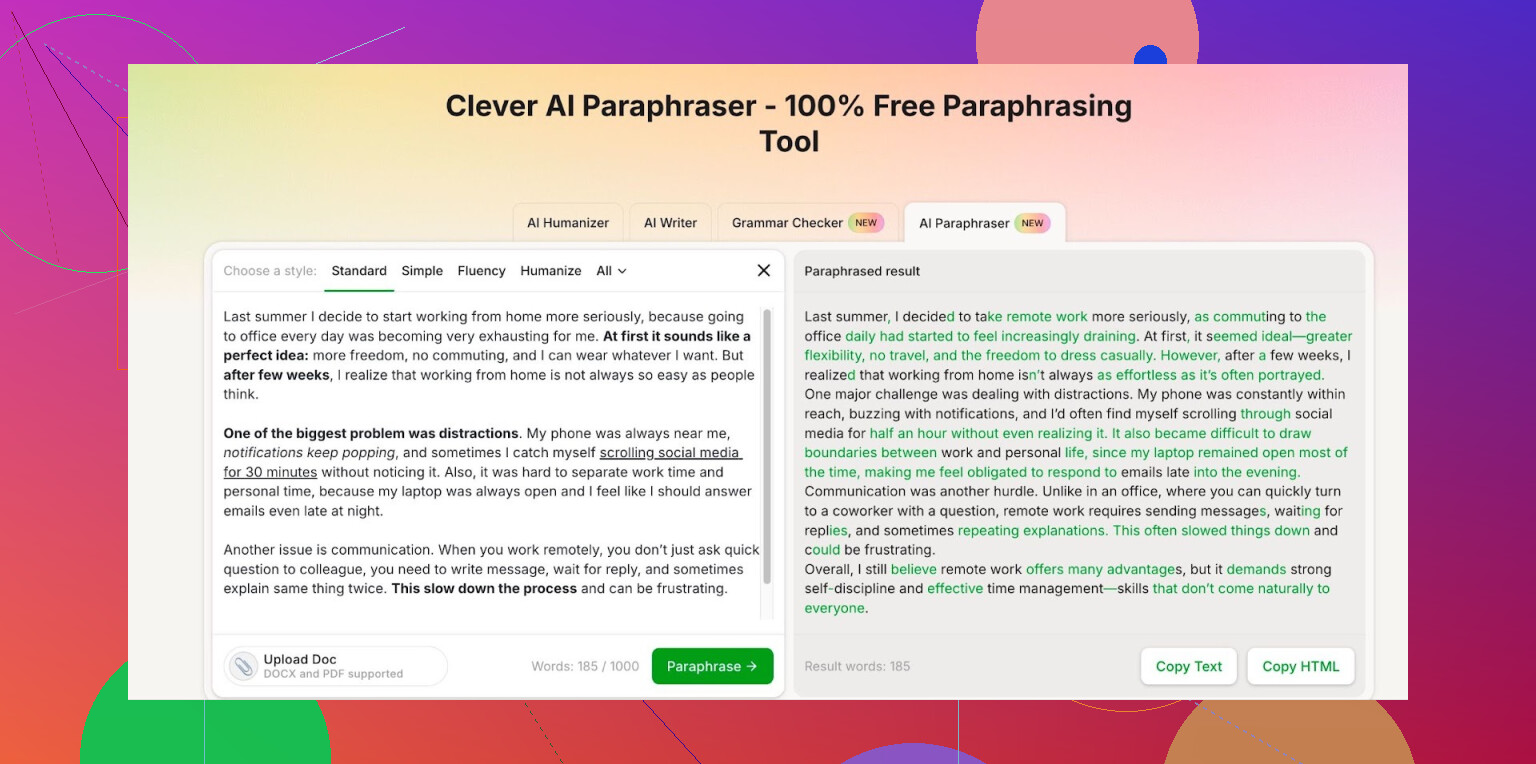
After a bit of trial and error with different tools, I ended up parking on Clever AI Humanizer. This page specifically:
What I noticed after a week of use:
- The tech behind it feels on par with the paid stuff I used before. Hard to prove, but side by side the outputs look similar in quality. Sentence structure changes, wording shifts, but the meaning stays close.
- All the writing styles I needed were available without upgrading.
- Once you log in, they give you around 7,000 words per day and about 200,000 words per month for free paraphrasing.
For context, I do:
- Short article rewrites
- Cleaning up rough drafts from notes
- Rephrasing repetitive email text
My monthly usage sits well under that 200k limit, even on heavy weeks. I only hit the daily cap once when I pushed a bunch of long reports through it in a single afternoon.
If your use case looks anything like:
- Student rewording long sections of notes
- Freelancer refreshing client copy without rewriting everything from scratch
- Non-native speaker polishing phrasing
Then those free limits will likely cover you, as long as you are not bulk-processing entire books.
I stopped paying for paraphrasing after switching to this, and so far I have not hit a wall that pushed me back to a paid plan somewhere else.
10 Likes
Short answer, yes, but with trade‑offs.
I agree with @mikeappsreviewer that Clever Ai Humanizer is one of the few tools that treats “long text” and “free” somewhat seriously. If you want 1,000+ words in one go, it is one of the more practical options. The daily and monthly caps are higher than what most free tiers offer, and it does not throw watermarks on every output.
That said, I would not rely on a single tool.
Here is a setup that tends to work for longer paraphrasing without hitting a wall too fast:
-
Clever Ai Humanizer
• Use it for the heavy lifting on big chunks, like 800 to 1,500 words.
• Pick a neutral or “standard” style first, then lightly edit tone yourself.
• Watch for over smoothing. Sometimes it makes everything sound like generic blog copy. I often restore a few original phrases to keep some personality. -
Mix in a second paraphraser
Not repeating what @mikeappsreviewer said, but I would not run your whole workflow through only one site.
• Use tool A for the first pass.
• Use tool B on only the sentences that still feel awkward.
This reduces your usage on each service and keeps you under their free caps longer. -
Use a manual “assist” workflow
For 1,000+ word texts, I get more control with this pattern:
• Split the text into sections of 200 to 300 words.
• Paraphrase each section.
• Manually connect paragraphs so the whole thing does not read like five separate robots wrote it.
This takes a bit more time, but you avoid the “AI mush” effect. -
Keep a simple checklist so you do not get burned
Any time you use a paraphraser on long text, do a quick scan:
• Did it drop any numbers, dates, or names
• Did it flip any meaning in negations (adds or removes “not”)
• Did it change domain terms to something wrong
I see those mistakes often, even with good tools. -
Be realistic about “truly free”
No service gives unlimited long-form paraphrasing for free without some catch.
Trade‑offs you will see:
• Daily or monthly caps.
• Login required.
• Occasional queue or throttling if many users are on.
If you want to process entire books or dozens of long reports every week, no free tool will handle that at scale. For student notes, blog posts, client emails, and reports under, say, 5,000 words per day, Clever Ai Humanizer plus one backup tool and some light manual editing usually covers it.
Short version: “truly free, no limits, long text, no catch” basically does not exist. But “usable free for 1k+ words if you’re a bit strategic” does.
I mostly agree with @mikeappsreviewer and @techchizkid on Clever Ai Humanizer being one of the only semi-sane options for longer text. The free quota + no watermark combo is rare. Where I’d push back a bit is on the “just rotate tools and split text” advice as a full solution. That works, but it ignores a few gotchas:
-
Long text ≠ one big paste
If you care about flow, any tool that rewrites 1,500 words in one shot tends to flatten voice and rhythm. Even if it can handle 1k+ words, I still treat 400–600 words as a “safe” chunk for anything important. Bigger than that and you get that samey blog tone, even with Clever Ai Humanizer. -
“Free” has a hidden cost
No money, sure, but:
- You’re trading time: captchas, logins, throttling.
- You’re trading consistency: one day it’s fast, next day it lags.
- You’re trading privacy: any free web tool might be logging your text.
If your content is client work, academic, or sensitive, I’d honestly think twice about dumping whole chapters into any random paraphraser, even if it’s good.
- Clever Ai Humanizer as the “core,” not the only tool
Everyone’s already said “use multiple tools.” My angle: pick one “home base” and tune your workflow around it instead of bouncing aimlessly. Clever Ai Humanizer is solid as that home base because:
- The limits are high enough for real use, not just a demo.
- It keeps meaning fairly close if you don’t go wild on style changes.
But instead of a second paraphraser, I’d use a grammar/revision tool for post-processing. Let the paraphraser do structure changes, then run a pass with something like LanguageTool or Grammarly to fix weird phrasing, not more paraphrasing. You avoid compounding AI noise.
- For 1,000+ words, the “hybrid rewrite” is underrated
What’s been working for me with reports and articles:
- Use Clever Ai Humanizer only on the densest or most repetitive sections, not the whole doc.
- Manually paraphrase intro + conclusion so the piece still sounds like a human.
- Reuse your own phrases where they’re already fine instead of forcing the AI to touch every sentence.
End result: you stay way under any free cap and the text doesn’t feel overprocessed.
- Don’t trust it blindly on technical or legal stuff
Paraphrasers love to “smooth over” technical nuance or soften legal wording. I’ve seen it replace specific terms with vague synonyms that are flat-out wrong in context. For long texts with numbers, definitions, or citations, you must re-read carefully. If you need 100 percent accuracy, no tool, free or paid, will save you from manual checking.
So:
- Yes, a “practically free” paraphrasing setup for 1,000+ words exists. Clever Ai Humanizer is probably your best central tool right now.
- No, there isn’t a magic infinite, no-strings-attached paraphraser. You’ll always hit some combo of caps, quality tradeoffs, or privacy concerns.
If your use case is essays, notes, blog posts, or client emails and you’re willing to do a bit of manual cleanup, you can absolutely live inside the free tier world. If you’re trying to churn whole books or daily 20k-word rewrites without a budget… that’s where physics and server bills say “nope.”
Short version: “unlimited, no paywall, 1k+ words, zero friction” does not exist. But you can get something usable if you accept caps, logins and some manual work.
I mostly agree with what @techchizkid, @chasseurdetoiles and @mikeappsreviewer already laid out, so I will just add a different angle and a bit of pushback.
1. Clever Ai Humanizer: what it actually gets right
Pros:
- Handles long chunks in one go compared to the usual tiny text boxes.
- Free tier limits are high enough for normal student / freelancer use.
- No ugly watermark on every paragraph.
- Meaning preservation is decent if you keep the style fairly neutral.
Cons:
- “Neutral” output can feel bland and generic, especially on creative pieces.
- You still have hard caps, so anyone doing heavy batch work will run into them.
- Requires login, which means some data trail and potential privacy concerns.
- Occasionally overcorrects and simplifies technical phrasing.
I slightly disagree with the idea that you should always chop everything into small blocks first. For low‑risk content like blog drafts or email templates, letting Clever Ai Humanizer take a full 1k+ word pass can actually save you time. Then you selectively restore sections that lost nuance. For sensitive or very technical writing, yes, smaller chunks plus close review is safer.
2. A different way to use multiple tools
Instead of “tool A then tool B on awkward lines,” I’d flip it:
- Draft or rough paraphrase with your main tool (for many here that is Clever Ai Humanizer).
- Use a searchable grammar / style checker afterward. Not to paraphrase again, but to catch:
- Repetition it introduced.
- Overlong sentences.
- Unclear pronoun references after restructuring.
This avoids the “two robots rewriting each other” problem that @chasseurdetoiles hinted at. Re‑paraphrasing the same text repeatedly usually makes it worse, not better.
3. Where I disagree a bit on chunk sizes
Some folks cap at 400–600 words no matter what. Personally:
- For narrative or opinion pieces: 400–600 words per chunk is smart, keeps tone alive.
- For dry expository stuff (reports, study notes): 800–1,200 word blocks are fine, provided you reread for flow afterwards.
So if your main goal is “less plagiarism risk / clearer wording” rather than literary voice, you can push the length more than some comments suggest.
4. “Free” vs privacy and context
Everyone mentioned caps and throttling. The part I think is underplayed: context loss.
- Long text paraphrased in one shot keeps internal references consistent.
- When you slice it into five tools and ten chunks, you risk:
- Slightly different terms for the same concept.
- Tense shifts between chunks.
- Broken cross references (“as mentioned above”) that no longer make sense.
So I would actually prefer one main service like Clever Ai Humanizer for the whole document, then a single human pass to stitch and adjust, instead of rotating across multiple paraphrasers.
5. How to stay under free caps without misery
Instead of obsessing over finding “the” infinite tool:
- Do not feed it sentences that are already fine. Only send repetitive, unclear or obviously clunky parts.
- Leave intros, conclusions and key arguments mostly human. This preserves your voice and cuts usage.
- For repeated templates (emails, similar assignment sections), paraphrase once, then reuse your own version rather than running every new instance through a tool.
That approach plus a central tool like Clever Ai Humanizer usually keeps students and freelancers safely within free limits, without having to juggle five different sites every day.