My Canon SD card was accidentally wiped before I backed up my photos, and I’m trying to recover deleted pictures from a recent shoot. These images are really important, and I need advice on the best photo recovery methods or software that works for Canon camera SD cards.
I’ve recovered deleted Canon shots before, so I wouldn’t write the card off yet. First thing I did, and what you should do, is stop shooting with the camera right now. When a photo gets deleted, the camera usually removes the index entry. The image data often stays on the SD card until new files land on top of it.
Pull the SD card out of the Canon body and plug it into your computer with a card reader. If your card has the little physical lock tab, slide it to locked before you connect it. Also, do not format the card, even if Windows or macOS throws up a repair or format prompt. I’ve seen people click that by mistake. Bad move. It often means the system can’t read the file structure cleanly, not that your photos are gone for good.
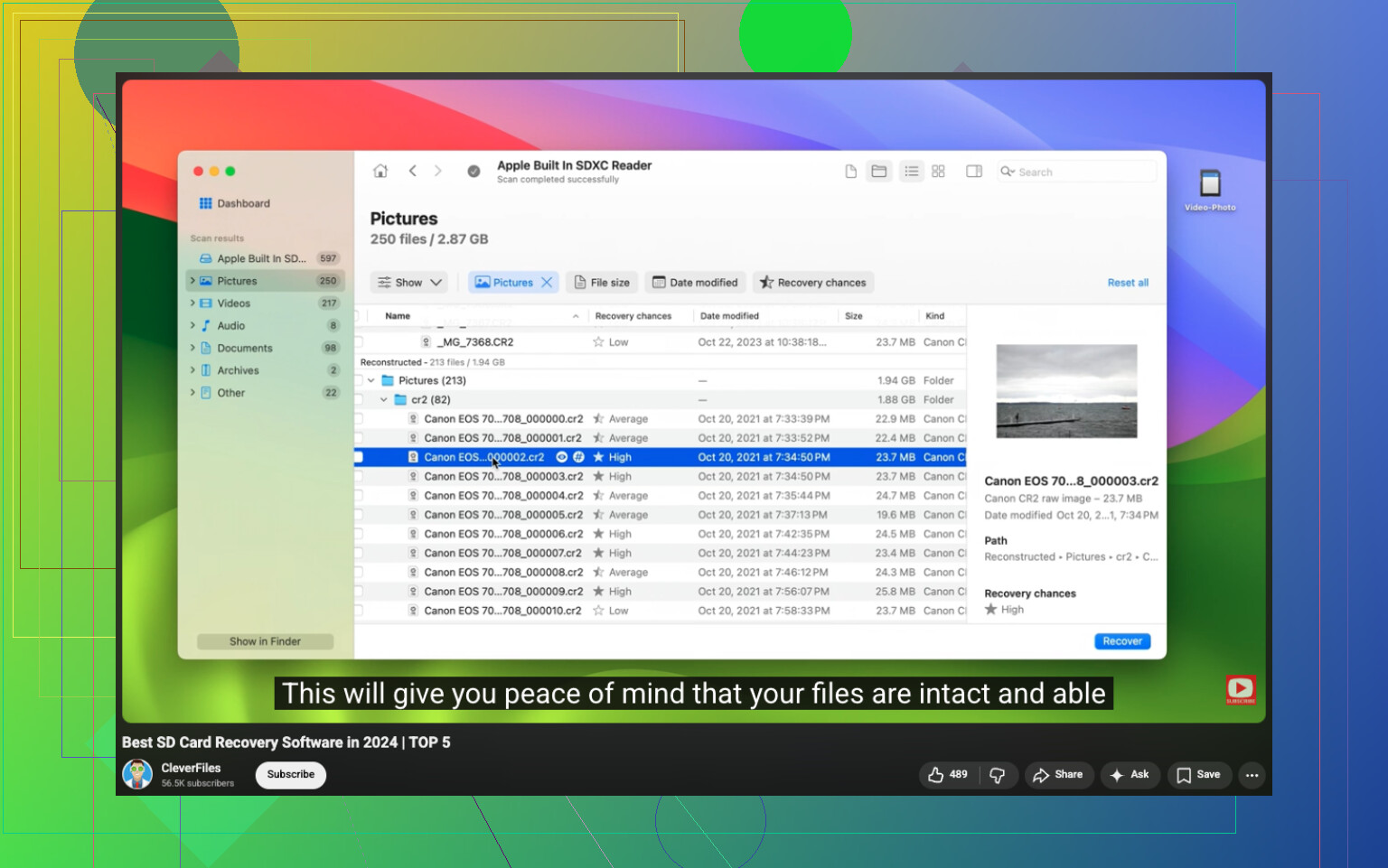
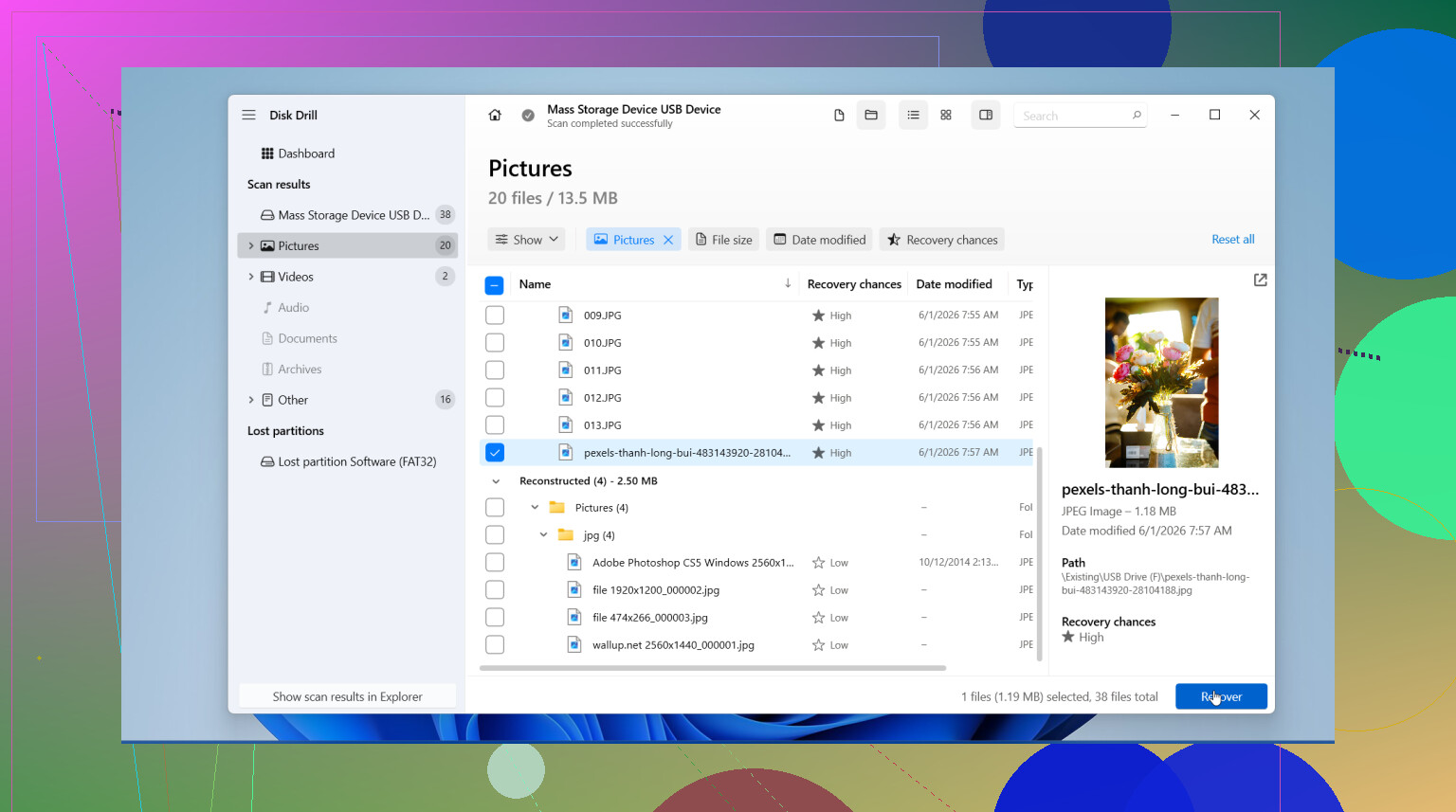
If I were starting from scratch, I’d try Disk Drill first. I used it on a Canon SD card once after a messy delete-and-reuse scare, and the preview tool saved me time. You can check whether the recoverable files still open before restoring them. It also reads common Canon image types, including RAW files.
What I’d do:
- Install Disk Drill on your computer.
- Insert the Canon SD card using a card reader.
- Pick the SD card inside Disk Drill.
- Run a Universal Scan.
- Go into the Deleted or Lost results.
- Filter the results to Pictures.
- Preview anything you want back.
- Recover the files to your computer, not to the same SD card.
Also check the boring places people forget. I found missing photos once in an old synced folder, which felt dumb and great at the same time. Look in Recycle Bin, Trash, Time Machine, File History, Google Drive, OneDrive, and Canon’s image.canon app if you’ve ever imported or synced the card before.
Your odds are best when the card hasn’t been used since the delete. If you kept shooting or recorded video after the loss, recovery gets a lot shakier. Still worth trying, tho.
15 Likes
If the card was “wiped” by a quick format in-camera, your odds are often better than people think. A full overwrite is the bad one. Quick format usually rebuilds the file table and leaves photo data sitting there until new shots replace it.
I agree with @mikeappsreviewer on one part, stop using the card. Where I differ is this, before scanning, make a byte-for-byte image of the SD card if the photos matter a lot. Use USB Image Tool on Windows or dd on Mac/Linux. Work from the image, not the card. If recovery software crashes or the card starts failing, you still have one clean copy. This matters more on older SD cards.
Then run Disk Drill on the image file or the card. Disk Drill tends to do well with JPG, CR2, and CR3 from Canon gear, and the preview helps sort intact files from junk. Save recovered photos to your computer or another drive. Never back to the SD card. If one scan misses RAWs, run a deeper signature scan too. It takes longer, but I’ve seen it pull files a fast scan skipped.
Two more checks people miss. Test the card in a different reader, because bad readers fake “dead card” issues all the time. Also look for hidden DCIM folders with a file browser set to show hidden files. Sounds dumb, but yup, it happens.
If you want a quick walkthrough, this video on photo recovery software for SD cards is decent:
watch this SD card photo recovery walkthrough
If Disk Drill finds files with correct previews, your chnaces are solid. If previews are broken or gray, some sectors got overwritten.
I mostly agree with @mikeappsreviewer and @viajantedoceu, but I’d add one thing they kinda danced around: if these pics are truly irreplaceable, skip the “try a bunch of apps first” impulse and treat the card like fragile evidence. Some recovery attempts are harmless, some are… less harmless.
What I’d do different:
- Check the card health first with something like H2testw or SD Card Formatter’s info readout. If the card is physically flaking out, repeated scans can make things worse.
- If the card mounts, copy the entire visible folder structure off first, even if it looks empty or corrupted.
- On Canon cards, don’t just hunt for JPG/CR2/CR3 by filename. Also look for sidecar files, small THM files, and odd folder names in DCIM/MISC. Sometimes that tells you whether the shoot is still structurally there.
- If Disk Drill finds the files, recover a small batch first and open them before doing a giant restore job. Faster way to see if you’re geting usable results.
Tiny disagreement with the “deep scan everything immediately” approach: deep scans are great, but they can strip filenames and folder structure. I usually try filesystem-based recovery first, then signature scan after.
Also, if the card was wiped in-camera, Canon sometimes leaves a surprisingly recoverable mess behind. If it was formatted and then reused heavily, that’s when things get ugly fast.
And for extra reading, this thread is relevant: Canon photo recovery advice from a Facebook discussion
Disk Drill is still a solid pick here, especially if you need Canon SD card photo recovery with previews, but test recovered files early so you don’t waste hrs restoring broken junk.
One thing I’d add to what @viajantedoceu, @byteguru, and @mikeappsreviewer said: check whether your Canon wrote dual-format bursts or video clips right before the wipe. Canon cards often end up fragmented more than people expect, especially if you shot RAW+JPG or mixed stills with short video. In that case, file-carving can recover images, but some recovered RAWs may open partially or lose original names.
My take: do not keep rescanning the physical card over and over if the first pass is bad. That advice gets repeated a lot, but repeated reads on a flaky SD card are not free.
What I’d do differently:
- Try to mount the card read-only if possible.
- Check whether the card capacity looks normal in Disk Management / System Information. If the size is wrong, that points to controller trouble, not simple deletion.
- Run one filesystem-aware scan first.
- Only then use Disk Drill or another tool for a deeper signature scan if the folder structure is gone.
Disk Drill pros
- Good preview support for photo recovery
- Usually finds Canon JPG and RAW formats well
- Easy to sort recoverable files fast
Disk Drill cons
- Deep scans can return lots of clutter
- Original filenames/folders may be lost
- Best features are not really a “free unlimited recovery” situation
If the card was truly wiped by overwrite, software won’t do miracles. If it was a quick format, odds are still decent. If the images are once-in-a-lifetime important and the card shows weird behavior, I’d stop DIY after one careful attempt and consider a lab before the controller degrades further.