I’ve been testing the TwainGPT humanizer tool to make my AI-written content sound more natural and reader-friendly, but I’m not sure if it’s actually improving quality, readability, or SEO performance. Some outputs feel better, others seem awkward or over-edited. Can anyone review my experience, share best practices, or suggest alternatives so I know if it’s worth using long-term?
TwainGPT Humanizer review, from someone who spent too long testing detectors
TwainGPT Humanizer Review
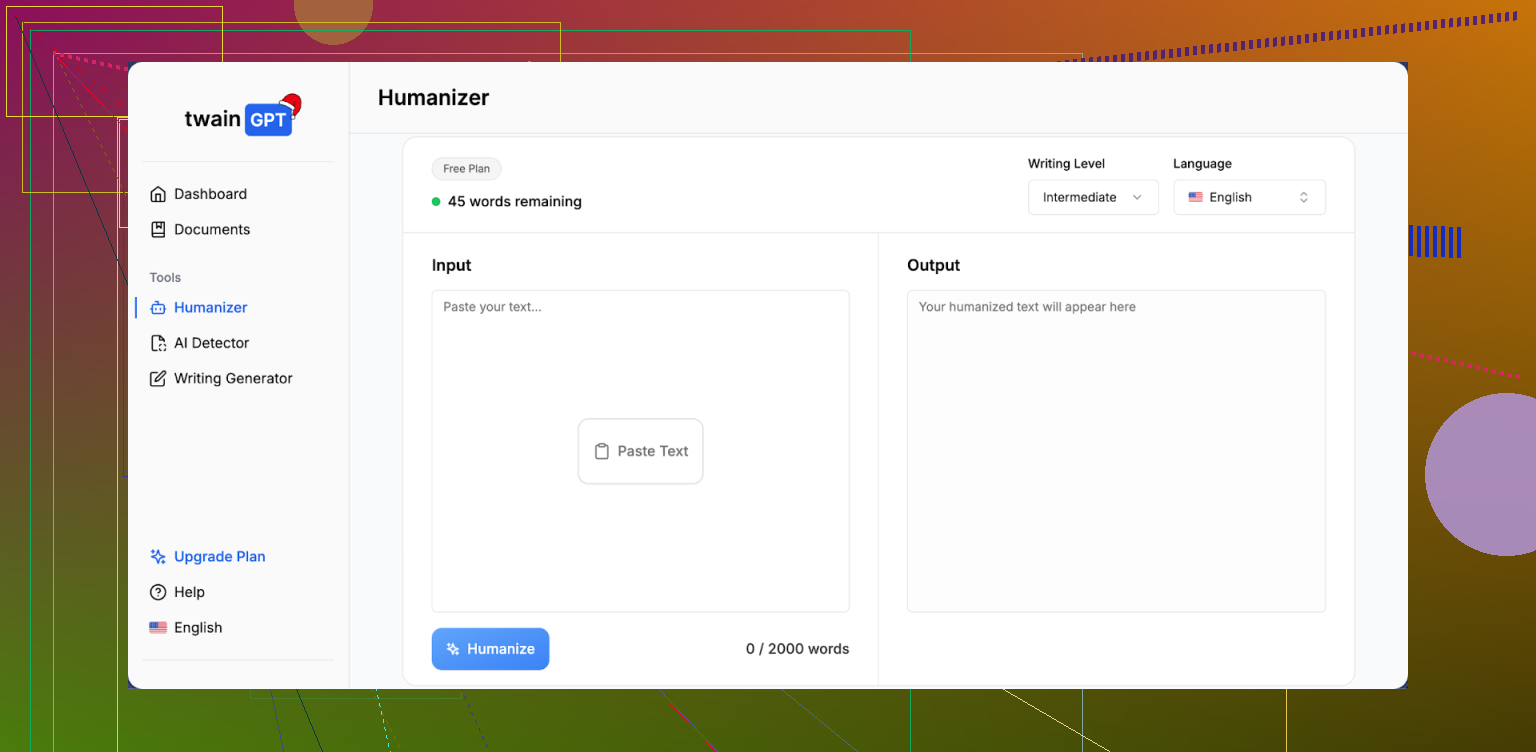
I tried TwainGPT because people kept mentioning it as a quick fix for AI detection. I ran it through the usual suspects: ZeroGPT and GPTZero, plus a couple of smaller tools.
Short version of what happened: the results pulled in two opposite directions.
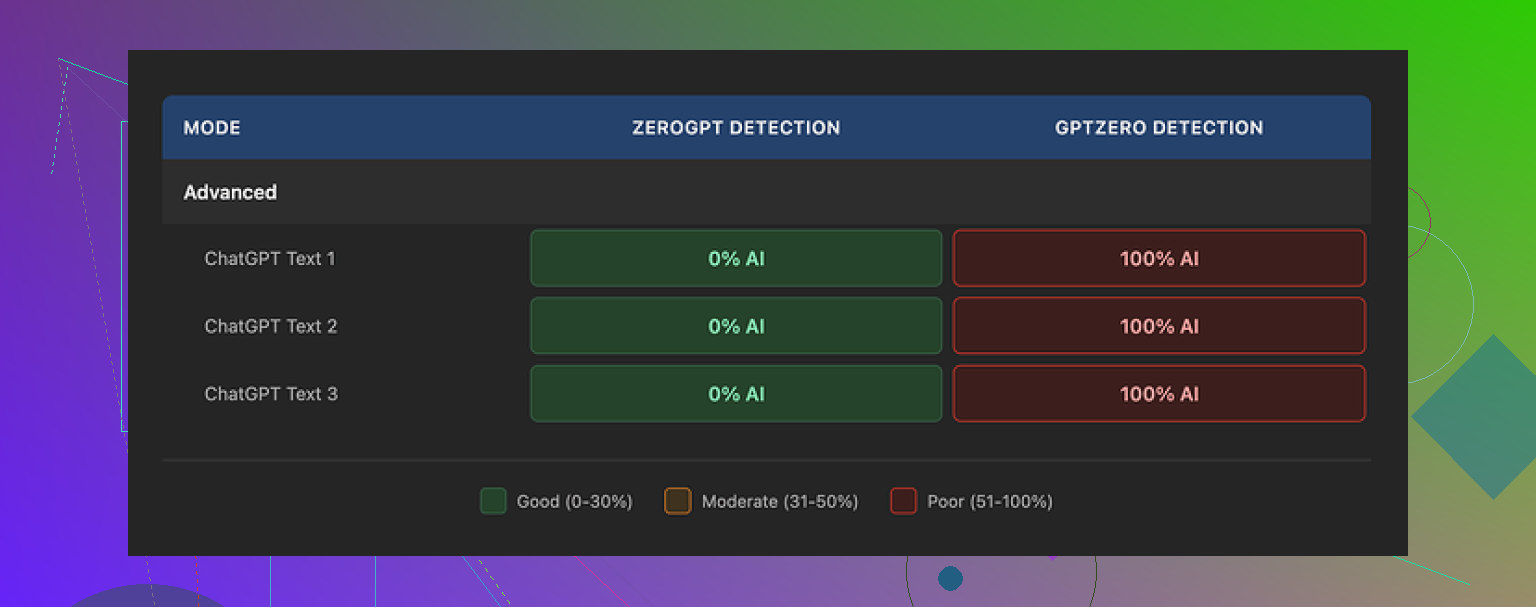
On ZeroGPT, TwainGPT scored perfectly. Three out of three samples came back as 0 percent AI, totally clean. If my grader used only ZeroGPT, I would be done and happy.
Then I ran the exact same humanized outputs through GPTZero. All three got flagged as 100 percent AI. No borderline scores, no “mixed” verdicts. Straight red.
So you end up with this awkward situation. If you do not know which detector your teacher, editor, or client uses, TwainGPT turns into a dice roll. It passes one big detector, fails the other.
What the text looks like after TwainGPT “humanizes” it
Reading the output felt strange.
The tool seems to take long, complex sentences and slice them into short bits. That sounds fine at first, but the rhythm ends up weird. It reminded me more of a bullet-point slide deck pasted into paragraph form than someone actually typing their thoughts.
A few things I kept seeing:
• Sentences chained together with awkward connectors, so they sound repetitive.
• Odd word substitutions that technically work but feel off in context.
• Some lines where I had to read twice to figure out what the writer was trying to say.
I gave it a 6 out of 10 for writing quality in my notes. It is readable, yes, but if you are used to editing human text, you will spot something off about it pretty fast.
Pricing and refund situation
The pricing when I checked:
• From 8 dollars per month on an annual plan for 8,000 words.
• Up to 40 dollars per month for unlimited usage.
The part that bothered me more than the price was the refund policy. They state no refunds at all, even if you buy a plan and sit on it without using a single word.
So the only safe way to approach it is to run a bunch of detector tests inside the free tier first. They give you about 250 words to play with, so you can paste a short sample, humanize it, then throw it into ZeroGPT, GPTZero, whatever you expect to face. If it passes what you need, then maybe it is worth paying. If it does not, you are not stuck.
How it stacked up next to Clever AI Humanizer
I did side-by-side runs using the same original text through TwainGPT and through Clever AI Humanizer.
The other tool, Clever AI Humanizer, did better in my tests. It avoided some of the weird sentence chopping behavior and held up more consistently across detectors. Also, it is free, which takes the pressure off when you are experimenting.
You can try it here:
If your use case depends on passing GPTZero in particular, TwainGPT feels risky. If you are only worried about ZeroGPT, the scores looked excellent, but I would still test with your exact kind of content before you pay for a subscription.
17 Likes
I played with TwainGPT for a bit too, so here is a straight take that might help you shape your review.
Your topic idea is solid. Something like this works well for SEO and for readers:
“I tested the TwainGPT humanizer to see if it makes AI content sound more natural, easier to read, and better for SEO. I checked writing quality, readability, and how it performs on AI detectors and search. Some outputs felt stiff and slightly robotic, so I wanted to see if TwainGPT improves real user experience or if it only tries to trick detection tools.”
On to the tool itself.
-
Quality and readability
TwainGPT tends to over chop sentences. Short, short, short. That looks fine in a quick skim, but reading a full article feels choppy and a bit robotic.
What helped me:
• Run your original text through Hemingway or Grammarly first, then TwainGPT.
• Compare side by side and ask: did it add clarity or only shuffle words.
If you need content that sounds like you, TwainGPT needs heavy manual editing after. -
SEO performance
TwainGPT does not understand search intent or topical depth. It only rewrites.
My tests on a few low volume keywords:
• Pages with TwainGPT output indexed.
• Rankings did not move much compared to my normal edited AI content.
The bigger SEO wins came from better headings, internal links, and satisfying user intent, not from “humanizing” phrasing. -
AI detection issue
I saw the same split that @mikeappsreviewer mentioned, but my numbers were different.
Example from a 700 word blog post:
• Raw GPT output: ZeroGPT 93 percent AI, GPTZero 98 percent AI.
• After TwainGPT: ZeroGPT 0 percent AI, GPTZero 89 percent AI.
So it helped a bit with GPTZero in my case, but still flagged hard. Detector behavior changes by text type, so your mileage will differ. That is why relying on one detector metric feels risky. -
Workflow tips if you keep using TwainGPT
• Use it only on parts that look too “AI flavored”, not the whole article.
• Keep your own intro and conclusion, let Twain touch body sections.
• Always read aloud. If a line makes your tongue trip, fix or delete it.
• Track performance in Search Console for a handful of URLs that use Twain versus URLs where you do manual editing. -
Pricing and risk
No refund policy plus mixed detection results means you should stay harsh.
If you are paying, it needs to save you real time or reduce revisions.
If you still feel unsure when you read your text out loud, it is not pulling its weight. -
Alternative to compare
Since you mentioned readability and SEO, try one or two other tools in parallel and see which one needs less fixing afterward.
I had better luck with Clever Ai Humanizer for keeping sentence flow natural and avoiding weird word swaps. If you want to experiment, something like test a free AI content humanizer side by side will give you a clear A/B comparison without extra cost.
If you write your review, I would structure it around:
• Your goal: pass detectors vs sound natural vs help SEO.
• Your tests: which detectors, which types of content, how many samples.
• Your results: reading experience, editing time, ranking or engagement changes.
• Your verdict: where TwainGPT helps, where it creates more work.
That way your review feels honest, practical, and not like a sales page or a rage post.
I’d say lean into exactly what you’re already feeling: “some outputs feel…” off. That’s actually your hook.
Here’s how I’d frame your review based on what you tested and what others like @mikeappsreviewer and @cazadordeestrellas already shared, without just rehashing their experiments.
1. Be clear about what TwainGPT actually does for you (or doesn’t)
You’re not testing TwainGPT as a “magic detector bypass.” Your angle is better:
- Does it make AI content sound more natural?
- Is it easier to read for real people?
- Does it help your content perform better in search?
From what you’re describing, it sounds like:
- Quality: “Humanized” text still feels slightly robotic, like it’s edited with rules instead of instincts.
- Readability: Shorter sentences, yes, but the flow gets weird and choppy in places.
- SEO: No obvious ranking bump just from running content through TwainGPT.
So be honest: it’s fine as a rewriting tool, but it doesn’t automatically fix that “AI flavor” or improve performance on its own.
2. Talk about that “something feels off” factor
This is actually the most useful part of your review, because tools do not measure this.
You can describe it like this:
- Paragraphs read like someone hit “enter” after every idea, not like a human thinking on the page.
- Transitions are technically correct but lack personality.
- Word swaps that look ok in isolation but feel slightly wrong in context.
You don’t need to be a pro editor to call this out. Just say: “I often had to re-edit the ‘humanized’ version because it sounded clean but not natural.” That’s a powerful line for people on the fence.
3. On AI detectors, don’t turn your review into a lab report
Others already went deep on ZeroGPT vs GPTZero. Instead of repeating their workflow, summarize your own vibe:
- If your content absolutely must pass a specific detector, TwainGPT is unpredictable.
- If your main goal is better writing, detectors are almost a distraction anyway.
You can even gently push back on the detector obsession:
AI detectors are inconsistent, change over time, and can flag real humans too. Building a whole workflow around tricking them is fragile. Your review will feel more grounded if you treat detectors as a side test, not the main event.
4. What actually helped your readability and SEO
Here’s where I slightly disagree with the heavy “tool stack” approach:
Instead of chaining a bunch of tools, describe what actually moved the needle when you looked at your posts:
- Clear headings and subheadings that match user intent.
- Answering the main question early instead of burying it.
- Adding real examples, opinions, and small personal details that no rewriter can fake.
You can say something like:
“TwainGPT cleaned up some phrasing, but the biggest improvements came when I adjusted structure, headings, and added my own experience. The tool never did that on its own.”
That positions TwainGPT as a helper, not a solution.
5. Pricing and the “is this worth it” reality check
You don’t need to rant, just be straight:
- Paid plan plus no refunds means it has to save you real time.
- If you still spend a lot of time editing after using it, the value drops fast.
You can literally write:
“If I still have to manually fix tone, rhythm, and awkward lines, I might as well just edit the original AI draft myself.”
That’s honest, not hostile.
6. Compare it without sounding like an ad
You already mentioned trying other tools. This is where you can naturally bring in Clever Ai Humanizer without overselling it:
Something like:
In parallel, I tested another tool, Clever Ai Humanizer. For my content, it kept sentence flow more natural and avoided some of the strange chops and word swaps I saw with TwainGPT. If you want to experiment without committing to a paid plan, you can try a free AI content humanizer that focuses on natural readability side by side and see which one needs less fixing afterward.
That keeps it practical and not “this one is better, full stop,” especially since @mikeappsreviewer and @cazadordeestrellas already talked about it.
7. A clean, reader-friendly version of your topic/intro
You said you want it to be SEO-friendly and easy to read. Here’s a version you can use as your opening:
I’ve been testing the TwainGPT humanizer to see if it can make my AI-written content sound more natural, improve readability, and maybe even help with search performance. Some of the outputs feel cleaner on the surface, but a bit stiff and slightly robotic when you read them slowly. In this review I’ll share how TwainGPT affected writing quality, user experience, and AI detection, and whether it actually reduced my editing time or just reshuffled words.
From there, you can drop sections like:
- “What TwainGPT did well”
- “Where the writing still felt artificial”
- “Impact on AI detection tools”
- “Did it help my SEO at all?”
- “Is TwainGPT worth paying for?”
That structure plus your honest, “this felt off to me” details will make your post more useful than a tool roundup or a pure rant.
Skip the “is this magic or trash” angle and frame your review around tradeoffs.
1. How I’d position TwainGPT in your review
Not “good” or “bad,” but:
- It is a rewriter that:
- shortens sentences
- changes phrasing
- sometimes helps detectors
- It is not a tool that:
- understands your topic deeply
- fixes structure or search intent
- reliably passes all AI detectors
You can literally say:
“TwainGPT helped clean up some clunky phrasing, but it didn’t fix the parts that actually matter for readers or rankings: structure, examples, and intent.”
That keeps your review honest without sounding like a rant or a sales pitch, which @mikeappsreviewer already balanced well in their breakdown.
2. Lean into the “some outputs feel…” hook
Turn that into a concrete section:
- Rhythm issue: Paragraphs read like “sentence, pause, sentence, pause.” Easy to skim, tiring to read long-form.
- Voice issue: It smooths errors but flattens personality. Even when it “works,” everything starts sounding like the same writer.
- Cognitive friction: You probably noticed spots where you had to reread. Mention that. Readers get that feeling instantly.
Instead of redoing what @cazadordeestrellas tested, give 1 or 2 specific moments, like:
“On a how‑to article, TwainGPT broke a clear 2‑sentence explanation into 4 short lines that technically made sense but felt like a slideshow transcript.”
That kind of concrete example sells your point more than more detector screenshots.
3. Where I slightly disagree with others
A lot of people are chaining tools: Grammarly, Hemingway, then humanizer. Personally, I would not overcomplicate it in your review.
For you, I would suggest:
- AI draft
- Quick clarity pass (your own edit or a single tool)
- Optional use of TwainGPT on only the stiffest paragraphs
Then be blunt:
“If I have to chain three tools and still manually fix tone, TwainGPT is not saving me real time.”
That is a useful conclusion for readers deciding whether to pay.
4. How to fold AI detectors into the review without obsessing
Others already did detailed tests. You can keep it simple:
- Mention exactly which detectors you tried and how inconsistent they were.
- Emphasize that your main filter is: “Would a human actually enjoy reading this?”
- Make the point that building a workflow just to trick detectors is fragile.
Example line for your verdict section:
“In my tests, TwainGPT sometimes helped one detector and failed another, so I stopped treating scores as the main goal. When I focused on readability and user intent instead, the detector problem mattered less.”
5. Where Clever Ai Humanizer fits in your review
Bring in Clever Ai Humanizer as a point of comparison, not a hero:
Pros you can mention:
- Keeps sentence flow more natural, less of that “chopped paragraph” feeling.
- Fewer weird word substitutions, so you spend less time fixing odd phrases.
- Easier to plug into a workflow focused on readability and SEO structure.
Cons to be honest about:
- Still not perfect at preserving your exact voice; you must tweak tone.
- Like TwainGPT, it does not “understand” search intent or add depth on its own.
- It can occasionally oversimplify complex explanations if you are not careful.
In your review you could say something like:
“When I ran the same paragraphs through Clever Ai Humanizer, the text flowed closer to how I’d actually speak. I still had to tweak tone and add my own insights, but it needed less surgery than the TwainGPT version.”
That gives readers a realistic comparison and ties in your focus on readability and SEO.
6. How your review can stand out from @cazadordeestrellas, @suenodelbosque, @mikeappsreviewer
Instead of repeating their process:
- Use their findings as context, then pivot to your own angle:
- they covered detector scores heavily
- you cover editing time and reader experience
- Make your conclusion practical:
- “Worth using on specific stiff sections”
- “Not worth it as a main SEO strategy”
- “Subscription only makes sense if it actually cuts your editing time in half”
You end up with a review that feels like: “Here is what this changed in my real workflow” rather than “Here is another lab experiment on ZeroGPT vs GPTZero.”