I accidentally emptied my SD card and deleted important videos I really need back. They include personal clips and files I hadn’t saved anywhere else, so I’m trying to find the best way to recover deleted videos from an SD card before anything gets overwritten.
Losing a video you needed feels bad every single time. I had it happen after a card format once, and the first mistake I almost made was shooting more clips on the same card. If you do one thing first, do this. Stop using the card.
First thing, pull the card out
Take the memory card out of the camera right away.
Do not record more video. Do not snap photos. Do not format it. Every time new data gets written, old video chunks get replaced, and your odds drop.
If your camera lets you plug in over USB, I still would not leave the card in there for recovery. I got better results with a plain card reader.
Check whether your computer still sees it
Put the card in a reader and connect it to your computer.
If Windows sees the card, even if it shows up as RAW, Unallocated, or says you need to format it, recovery software still has something to work with in a lot of cases.
If you do not see it in File Explorer, open Disk Management and look there. I have seen cards missing from Explorer but still listed in Disk Management, and those were still worth scanning.
The big snag with video recovery
This part trips people up.
A lot of file recovery apps do fine with photos and documents, then fall apart with camera video. Video from cameras, drones, dashcams, and action cams often gets scattered in tons of separate pieces across the card. So the old method of finding a file start and guessing the rest does not hold up well.
For this job, I usually point people to Disk Drill.
The reason is its Advanced Camera Recovery mode. It was built for fragmented camera footage. Instead of grabbing a header and hoping for the best, it checks video fragments and tries to rebuild the clip in the right order. I have seen this matter with footage from GoPro, DJI, Sony, Canon, Nikon, Insta360, dashcams, and similar gear.
Basic recovery steps
Here is the short version.
- Download and install Disk Drill.
- Connect the original memory card with a card reader.
- Open Disk Drill.
- Pick your SD card from the device list, click Search for lost data, then choose Advanced Camera Recovery.
- Run the scan and let it finish.
- Preview any videos it finds.
- Recover them to a different drive.
Do not save recovered files back to the same memory card. I know it sounds obvious, but people still do it in a rush. Save to your PC or another storage device.
When software is enough
If the issue came from deletion, formatting, file system damage, or some other logical problem, software recovery usually makes sense as the first move.
I would try software first when the card still shows up and stays connected.
When I would stop and use a lab
There is a line where DIY stops being smart.
I would look at professional recovery if:
- The card has physical damage.
- It gets hot fast after you plug it in.
- Your computer does not detect it at all.
- It keeps disconnecting during scans.
- The camera reports hardware errors.
- The footage matters for work, money, or a client, and you do not want to risk making it worse.
At that point, repeated home attempts tend to make things uglier. A recovery lab might read the memory chips directly, which you and I are not doing on a kitchen table.
What I’d do, in order
- Stop using the card.
- Remove it from the camera.
- Connect it with a card reader.
- Check File Explorer, then Disk Management.
- If detected, scan it with recovery software built for camera footage.
- Recover to a different drive.
- If the card shows hardware symptoms, stop there and send it out.
That order matters more than people think. The first hour after data loss is where most self-inflicted damage happens.
12 Likes
Yes, if you emptied the SD card by mistake, your videos still have a shot at recovery. The key detail is what happened after deletion. If you kept using the card, recovery odds drop fast. If you stopped right away, your chances are much better.
I agree with @mikeappsreviewer on one part, stop writing anything to the card. Where I differ is this. Before you run recovery software, make a byte-for-byte image of the SD card if your PC reads it. Work from the image, not the original card. If a scan crashes, or the card starts failing, you still have one clean copy of the current state. That step saves people more often than they think.
A few practical points.
- Do not use CHKDSK, First Aid, or any repair tool yet. Those tools change file system data.
- If the videos came from a phone, check cloud sync, hidden trash, Google Photos, iCloud, or the app folder first.
- If the card was used in a camera, video recovery is harder than photo recovery because clips are often fragmented.
For DIY recovery, Disk Drill is one of the better picks for deleted videos from SD cards, esp if the footage came from a camera. Scan the card or its image, preview what it finds, and recover to your computer, not back to the card.
If you want a visual walkthrough, this SD card video recovery tutorial for deleted files covers the process in a clean way.
If the card disconnects, shows 0 bytes, gets hot, or asks to be formatted over and over, stop DIY stuff. At taht point, a recovery lab is the safer move.
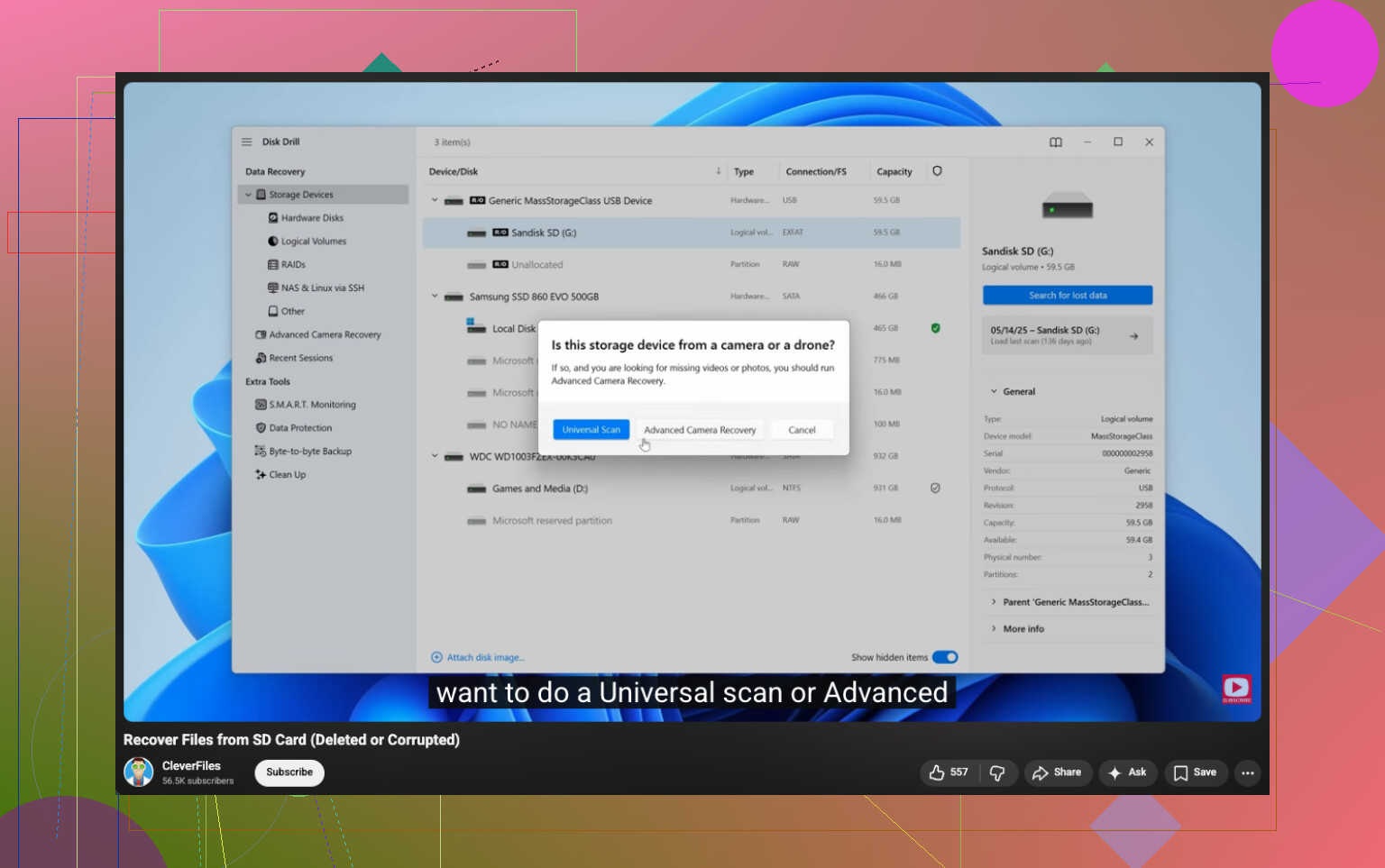
If you emptied the SD card by mistake, the videos are often not truly gone right away. The file entries get removed, but the actual video data can still sit there until something overwrites it. So yeah, recovery is possible, but only if the card has not been used much since.
I mostly agree with @mikeappsreviewer and @sonhadordobosque, but I would push one extra thing that people skip: check the card type and the device that made the videos. Some cameras record in exFAT, some in FAT32, and some split long videos into chunks. That matters because sometimes what looks like “missing videos” is actually a broken index or separated clip segments, not total deletion. I’ve seen people panic, then realize the camera created multiple parts of the same recording.
Also, I would not spend too long trying random free tools from page 9 of Google. That’s how people turn a recoverable card into a mess. If the card is still readable, use something established. Disk Drill makes sense here, especially for SD card video recovery, because it tends to handle deleted media better than a lot of generic file tools. Just recover everything to your computer or an external drive, not back onto the card. Sounds obvious, but yep, people still do it.
One small disagreement with the “always image first” advice: if you’re not technical, making an image can confuse you and waste time. It is smart, yes, but if the card is stable and you’re likely to mess up the imaging step, a direct read-only style scan with decent recovery software may be more realistic. Depends how comfy you are with this stuff.
Before doing anything serious, also check whether the videos were ever auto-imported to a phone, tablet, cloud app, or video editor cache. Sometimes the “lost” file is sitting in Adobe, CapCut, Photos, or a temp import folder looking all smug.
If you want more discussion on this exact issue, this thread about recovering deleted videos from an SD card after accidental deletion is pretty relevant.
Short version:
- Stop using the card.
- Check if the files exist anywhere else first.
- If the card reads, scan it with Disk Drill.
- Save recovered videos somewhere else.
- If the card is acting weird, stop messing with it.
That’s the boring but real answr. Time matters a lot here, so don’t keep poking at the card for hrs.
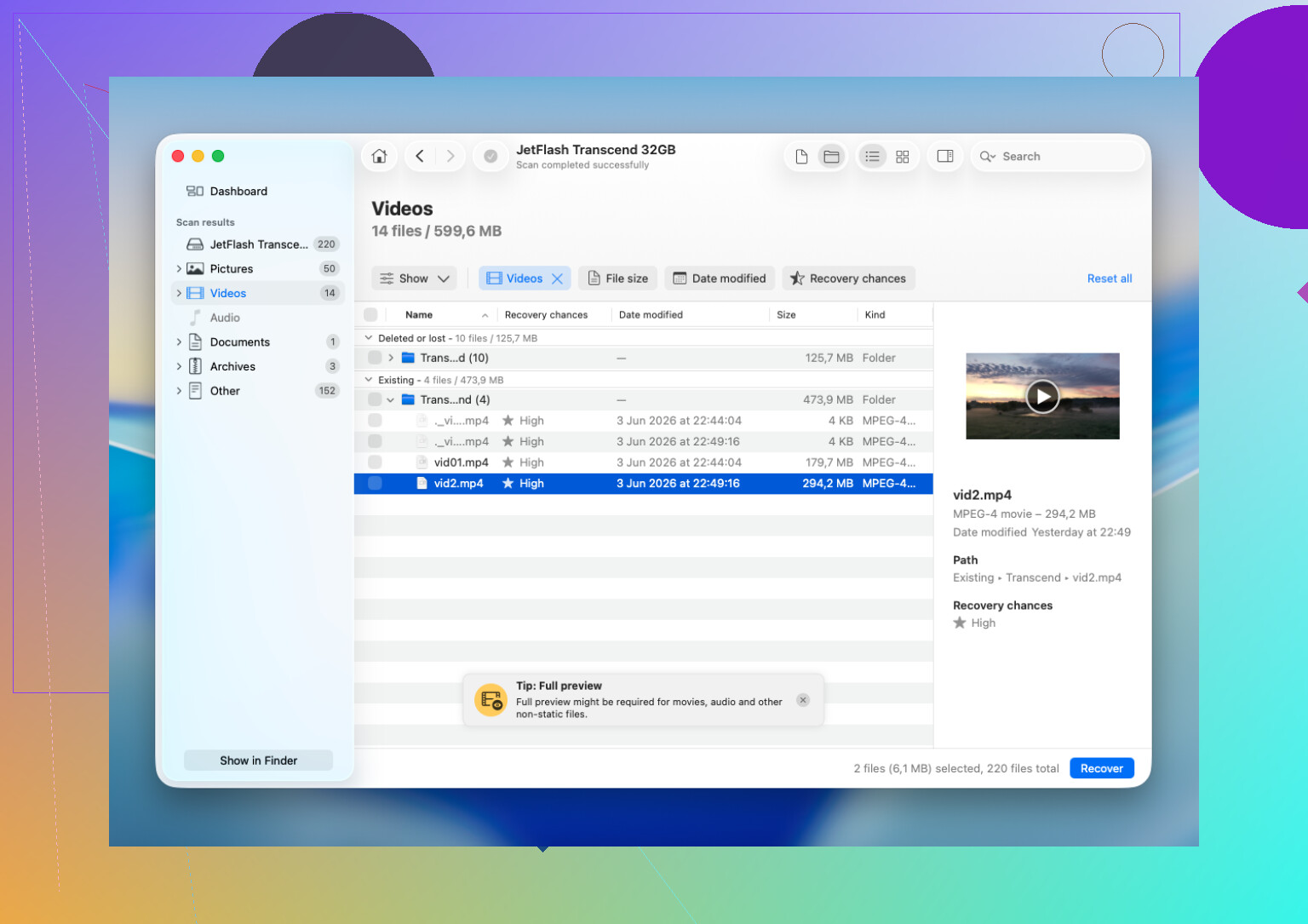
Yes, maybe, but I’d add one thing the others only touched on lightly: if the card is from a phone or newer camera, deletion is sometimes followed by background cleanup or TRIM-like behavior. That can make recovery worse even when you stopped using it fast. So I would not assume “deleted” always means “still sitting there untouched.”
I’m with @sonhadordobosque, @sternenwanderer, and @mikeappsreviewer on not writing anything new to the card. Where I slightly disagree is the idea that software is always the next move. If the videos are irreplaceable, first check whether the camera or phone created low-res proxies, app exports, or transferred copies to another device. People skip that and go straight into recovery mode.
About Disk Drill specifically:
Pros
- good interface, not a pain to use
- decent with SD cards and deleted media
- preview can save time
- useful if the card still mounts normally
Cons
- deep scans can take a while
- video recovery is never guaranteed
- license cost may sting if this is a one-time problem
- if the card has hardware issues, software can only do so much
So yes, Disk Drill is a reasonable option if the card is readable. Just keep expectations realistic. Deleted videos recover less cleanly than photos, especially long recordings. If scans show lots of broken clips, that is normal, not necessarily user error. If the card is unstable, stop before you make a bad situation worse.